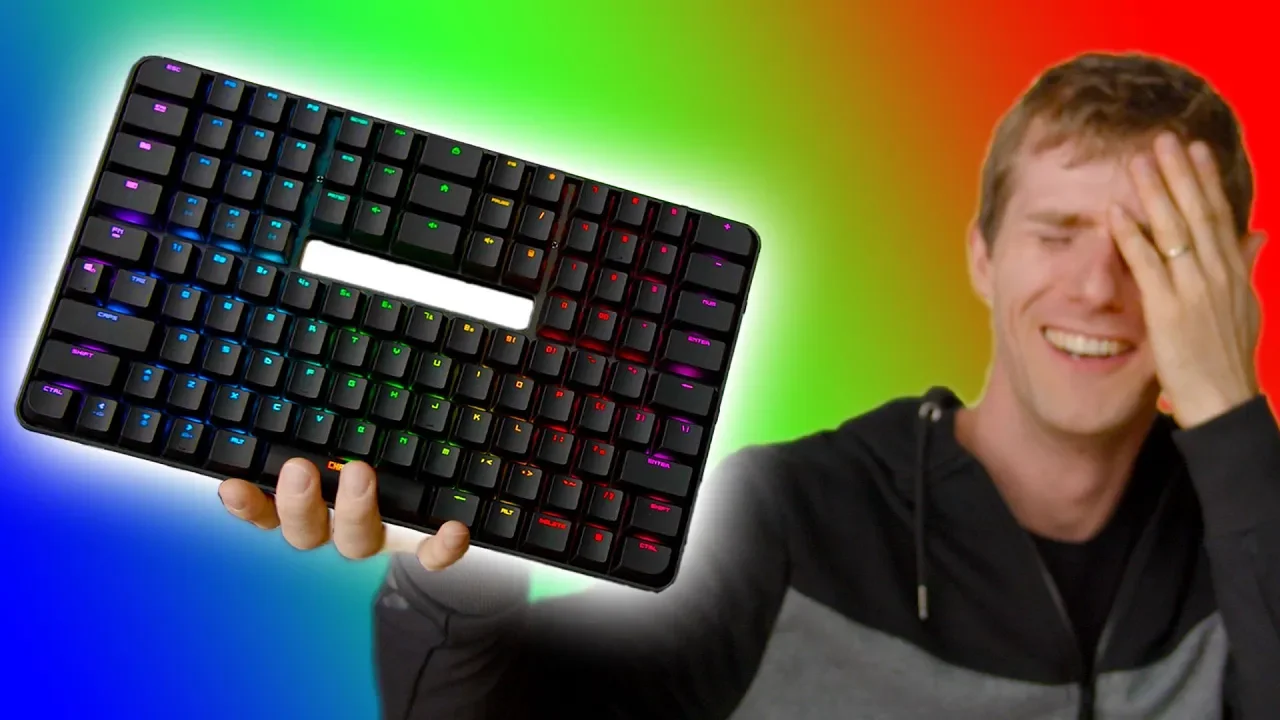
Who would WANT a Keyboard like this? – Chassepot C1000 Review
0 up · 0 down · 0 ratings
Promos
Buy a Seasonic Ultra Titanium PSU On Amazon: geni.us On NewEgg: lmg.gg Use offer code LINUS to save 40% on Madrinas Coffee at madrinascoffee.com This gaming keyboard gives you more space for your mouse without sacrificing the numpad or your macro keys! Buy keyboards on Amazon geni.us Discuss on the forum: linustechtips.com Our Affiliates, Referral Programs, and Sponsors: linustechtips.com Get Private Internet Access today at geni.us Displate metal posters: lmg.gg Linus Tech Tips merchandise at lttstore.com Linus Tech Tips posters at crowdmade.com Our Test Benches on Amazon: amazon.com Our production gear: geni.us Twitter - twitter.com Facebook - @LinusTech Instagram - @linustech Twitch - twitch.tv Intro Screen Music Credit: Title: Laszlo - Supernova Video Link: youtube.com iTunes Download Link: itunes.apple.com Artist Link: soundcloud.com Outro Screen Music Credit: Approaching Nirvana - Sugar High youtube.com
The Chassepot C1000 is pitched as a 114-key keyboard with an unconventional design intended to reclaim desk space for mouse movement while retaining a full complement of keys, including a numpad and macro capabilities. The video opens by framing the appeal of 10-keyless layouts for gamers, then introduces the C1000 as a bold reimagining of key placement. The host immediately notes that the overall idea conflicts with traditional typing habits, highlighting the left-side arrow key cluster and the relocation of navigation keys, as well as the unusual placement of Windows, tilde, and shift keys. He critiques how these changes disrupt muscle memory, and demonstrates how one typo or mispress can disrupt a sentence or workflow. Despite these criticisms, the host acknowledges that the keyboard offers robust remapping options through the Chassepot Power Console software, which allows customization of many keys and macros. The device is built with a steel top plate that lends weight and rigidity, UV-coated ABS keycaps, and a carry handle, presenting a sleek yet unconventional aesthetic. The C1000 comes in two variants, Go and Pro, with different lighting schemes and switch options, and there is even talk of Cherry MX compatibility at a premium. Battery life is advertised for Bluetooth wireless use across up to three devices, and wired mode is available to leverage USB pass-through. The host questions the product’s value proposition at its price point, arguing that the layout choices and non-remappable keys diminish plug-and-play usability, though he concedes that the keyboard is well-made and visually striking. In closing, the review suggests potential buyers consider whether the unique form factor and ambitious design justify the trade-offs, and teases a future follow-up review of a Cherry MX-equipped variant.
Topics · hardware · technology · product_review · ergonomics
Questions answered
- What makes the Chassepot C1000 layout different from standard keyboards?
- The C1000 moves the arrow keys to the left side of the board and relocates several navigation and modifier keys, creating a nonstandard layout intended to free desk space but potentially disrupt typing habits.
- Can you customize keys on the C1000, and how extensive is the customization?
- Yes, the C1000 supports remapping almost all keys through the Chassepot Power Console software, including macros, with only a few buttons by default non-remappable.
- What variants exist for the C1000 and what are the main trade-offs?
- There are two versions, the Go and the Pro; the Go has a white LED backlight and blue switches, while the Pro offers full RGB with various switch options. The trade-offs include layout novelty versus traditional ergonomics and the potential extra cost for Cherry MX compatibility.