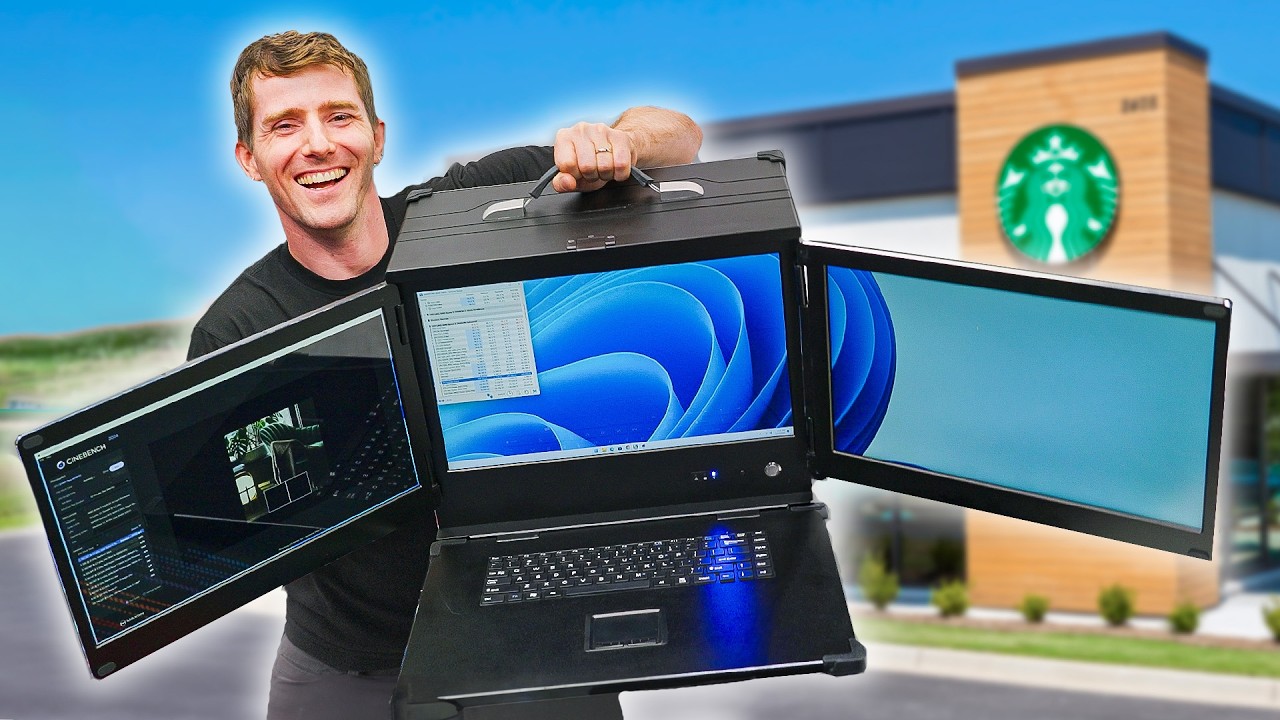
I Built My Own "Laptop" and Tried to Use it in Starbucks
0 up · 0 down · 0 ratings
Description
Save up to 40% and get Free Shipping at Ridge by using the link ridge.com Have you ever thought "Laptops sure are great, but I wish they had 3 monitors, desktop components, and weighed 20 times as much"? Good news! With the MaCase B43 chassis your PC can go from a portable, reasonably powered slate that lives in your backpack to a monstrously huge Frankenstein machine capable of running several instances of Crysis. This thing games so hard you'll totally forget about the disc you slipped in your back while trying to get it up onto the table. Discuss on the forum: linustechtips.com
Check out these monitors. They sure are monitors. 16:10 Gaming, yes. Temperature 17:05 Conclusion
Promos
Check out the Macase B43 on Alibaba: lmg.gg Buy an AMD Ryzen 9 7950X3D CPU: geni.us Buy an ASUS Crosshair X670E Gene Motherboard: geni.us Buy a Noctua HL-L12Sx77 CPU Cooler: geni.us Buy KingBank SharpBlade 6400MTs CL32 16GBx2 DDR5 RAM: geni.us Buy a Crucial T705 2TB NVMe M.2 SSD: geni.us Buy a ZOTAC GAMING AMP Extreme Airo GeForce RTX 4090 Graphics Card: geni.us Buy a Cooler Master Universal Vertical Graphics Card Holder Kit (V2): geni.us Buy a Cooler Master V1100 SFX 80+ Platinum PSU: geni.us Purchases made through some store links may provide some compensation to Linus Media Group. ► GET MERCH: lttstore.com ► GET EXCLUSIVE CONTENT ON FLOATPLANE: lmg.gg ► SPONSORS, AFFILIATES, AND PARTNERS: lmg.gg ► EQUIPMENT WE USE TO FILM LTT: lmg.gg ► OUR WAN PODCAST GEAR: lmg.gg FOLLOW US --------------------------------------------------- Twitter: twitter.com Facebook: @LinusTech Instagram: @linustech TikTok: @linustech Twitch: twitch.tv MUSIC CREDIT --------------------------------------------------- Intro: Laszlo - Supernova Video Link: youtube.com iTunes Download Link: itunes.apple.com Artist Link: soundcloud.com Outro: Approaching Nirvana - Sugar High Video Link: youtube.com Listen on Spotify: spoti.fi Artist Link: youtube.com Intro animation by MBarek Abdelwassaa @mbarek_abdel Monitor And Keyboard by vadimmihalkevich / CC BY 4.0 geni.us Mechanical RGB Keyboard by BigBrotherECE / CC BY 4.0 geni.us Mouse Gamer free Model By Oscar Creativo / CC BY 4.0 geni.us CHAPTERS --------------------------------------------------- 0:00 Introducing the Case 3:47 CPU, Mobo, Cooling 5:55 RAM, SSD, GPU 7:24 Fitting the GPU and everything else in the case 9:55 Cooling with a custom side panel 11:22 PSU + GPU Stabilizer 13:22 Testing it out 14:31
The video explores an ambitious project: building a portable, triple-monitor desktop PC inside a briefcase-like chassis and attempting to use it in a Starbucks setting. The presenter walks through the unusual case design, highlighting its heavy weight, front-heavy balance, and the surprisingly ample internal space that allows for higher-end desktop components. There is a detailed discussion of the display upgrade from the prior build, featuring 17.3 to 18.5 inch panels, and the challenges of integrating display controller boards and legacy connections like VGA, which modern GPUs do not natively use. The build shifts to the core PC components, where the team debates between a top-tier Ryzen 9 7950X3D for multi-threaded tasks and the motherboard choice that could better accommodate a robust cooler. Cooling becomes a central narrative thread, as radiators prove impractical inside the cramped chassis, leading to a sequence of cooler selections from liquid cooling aspirations to an NH-L12SX77 solution and subsequent RAM and storage choices to balance performance and form factor. Power delivery and GPU mounting introduce further complexity, including the necessity of a vertical GPU holder and a 90-degree adapter due to space constraints, followed by a meticulous cable management plan that aims for a clean, positive-airflow setup. After assembling and wiring, the system is powered on for a test boot, memory overclocking is configured, and NVIDIA Surround is set up to test the multi-monitor experience, even though the monitors operate at 1080p 60Hz with IPS panels and no HDR. The narrative culminates with reflections on the practicality of such a device for real-world use, noting the compromises in ergonomics, cooling, and portability, while acknowledging its niche appeal and price point around $1,500 for the chassis, monitors, and peripherals. The video closes with sponsor segments and a lighthearted tone, contrasting the impractical, overbuilt nature of the project with a humorous, dad-joke filled sponsor spot and a call to check similar content on related displays. Overall, the episode blends hands-on mechanical tinkering, high-end component choices, and experiential testing to showcase both the potential and limits of taking desktop performance on the road.
Topics · technology · gaming · diy_pc · laptops · experiments
Questions answered
- What were the main cooling challenges and how were they addressed in the build?
- The team found that traditional radiators would not fit inside the compact case, so they explored external mounting and ultimately used an NH-L12SX77 cooler to manage heat while keeping hardware compatible with RAM clearance.
- Why was a vertical GPU mounting solution necessary?
- A vertical GPU holder was required due to space constraints and the need to accommodate a tall graphics card inside the chassis, along with a 90-degree power adapter to fit the power connections without stressing the connector.
- What are the monitors like and what limitations do they have?
- The displays are IPS panels, 1080p, 60Hz, with no HDR, and they are mounted on larger 17.3 to 18.5 inch screens, requiring a controller board for desktop input signals.
- Is the setup practical for real-world use?
- The setup is highly niche and carries compromises in ergonomics, portability, and cooling, making it impractical for everyday coffee shop use, but it serves as a proof of concept for high-end portable desktop experimentation.