Mixed Reality Streaming Setup - How To: Advanced
0 up · 0 down · 0 ratings
Promos
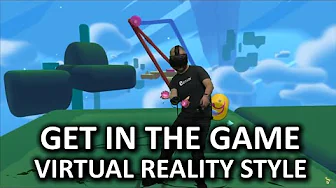
Mixed reality is an absolute gamechanger for streaming VR. Here's how you can set it up in "Fantastic Contraption!" Squarespace link: Visit squarespace.com and use offer code LINUS to save 10% off your first purchase. Cooler Master link: linustechtips.com Written guide: northwaygames.com Pricing & discussion: linustechtips.com Support us: linustechtips.com Join our community forum: bit.ly twitter.com @LinusTech Intro Screen Music Credit: Title: Laszlo - Supernova Video Link: youtube.com iTunes Download Link: itunes.apple.com Artist Link: soundcloud.com Outro Screen Music Credit: Approaching Nirvana - Sugar High youtube.com Sound effects provided by freesfx.co.uk
This video provides a comprehensive guide to mixed reality streaming using a VR headset, with a focus on the HTC Vive and the game Fantastic Contraption. It starts by explaining the core idea of mixed reality: transposing the in-game environment onto a green screen so viewers see the player appear to walk through a virtual world. The presenter outlines the essential hardware required, including a green screen, an HDMI camcorder, and a capture card, and emphasizes the importance of flexible camera placement to optimize the final stream look. Basic setup steps are detailed, such as mounting the green screen, ensuring strong lighting for clean keying, and choosing a suitable camcorder rather than a webcam. The workflow then shifts to software, introducing OBS as the main tool to combine three visual layers: the game foreground, the background from the real-life camcorder, and the VR background. The host explains how to configure OBS with window capture, video capture device for the camcorder, and a separate layer for the VR foreground, including adjusting resolution to match the depth camera split. Practical tips are given for syncing the real and virtual worlds, such as aligning in-game camera angles with the camcorder view and using a third-person field of view adjustment to blend the perspectives. The guide concludes by noting the final result can be impressive and unique for a streaming channel, even though the setup is involved and requires careful calibration to look convincing, not perfect like a blockbuster film but still distinctly engaging for viewers.
Topics · technology · video/streaming · virtual reality · how-to
Questions answered
- What basic equipment do I need to start mixed reality streaming with a VR headset?
- You need a VR headset (like the HTC Vive), a green screen, an HDMI camcorder (webcams are not ideal), and a capture card with an HDMI output. A reasonably long HDMI cable helps you position the camcorder effectively. A computer capable of running OBS and the VR game, plus a suitable lighting setup for clean green screen keying, is also essential.
- How do I set up OBS to integrate the game, camcorder feed, and green screen background for mixed reality?
- In OBS, add three sources: a window capture for the game background, a video capture device for the camcorder feed, and a second window capture or similar for the VR foreground. Enable color key on the camcorder layer to key out the green screen, and set the canvas resolution to match the game and depth camera constraints. Ensure the depth camera layer is scaled to fit within OBS and synchronize camera positions with in-game motion.
- What practical tips help align real-world camera work with in-game actions for a convincing mix?
- Match the in-game camera with the real camcorder by adjusting the virtual camera using keyboard inputs (for example WASD and Q/E) and, if possible, have a friend move the real camera to track the gameplay. Tuning the in-game field of view to align with the real camera perspective improves realism, and you can use a handheld mode in-game if you want dynamic camera movement. Finally, verify that the overall composition fills the frame without exposing areas outside the green screen.