HD Tutorial: Produce any Video in 16:9 HD
0 up · 0 down · 0 ratings
Description
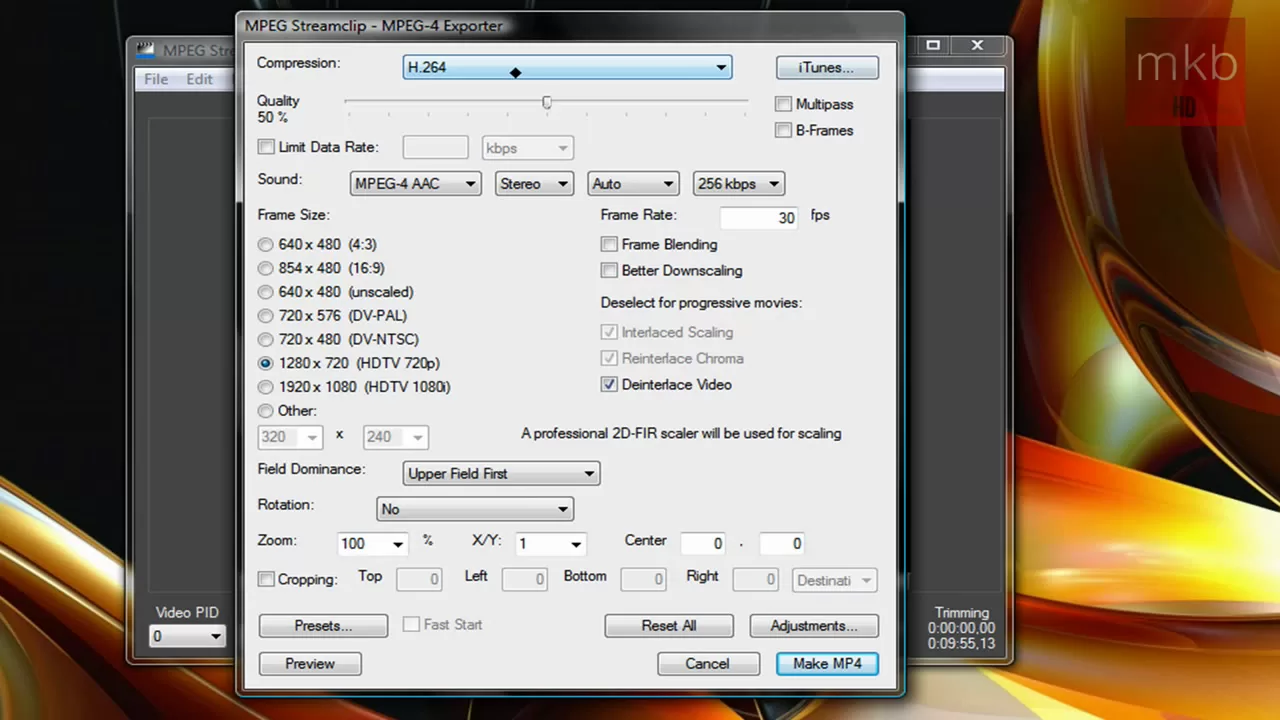
***WATCH IN HD*** In this tutorial, I'll show you how to ensure that any video you upload to any website, or email to anybody, will be in the highest possible quality. To do this, run it through a render using MPeg Sreamclip. Here's your link: squared5.com The software is really easy to use, and you can even do a bit of simple editing before you render. Enjoy - SUBSCRIBE
The video presents a practical, hands-on tutorial by Marcus Brownlee on converting a 4:3 video to a 16:9 HD output using MPEG Streamclip. It begins with the intent of achieving the highest possible quality when uploading or sharing videos, especially for audiences watching in HD. The host walks through assembling a short sample set of AVI clips, opening them in MPEG Streamclip, and selecting export options that emphasize high quality, including enabling de-interlacing, choosing 30 frames per second, and setting the output to 1280 by 720 HD resolution. He discusses the trade-offs between quality and file size, noting that H.264 offers superior compression but can yield very large files, sometimes approaching a gigabyte or more. The walkthrough shows the rendering progress in the program, and the presenter emphasizes that the method is compatible with non-HD cameras to achieve HD results. The video closes with encouragement to rate, comment, and subscribe for more HD tutorials, and invites viewers to request additional topics. Overall, the video aims to equip creators with a straightforward workflow to maximize video quality for online distribution, while highlighting practical considerations like editing options before render and upload time considerations.
Topics · technology · education · video-production · tutorials
Questions answered
- What software does the video recommend for rendering HD with maximum quality?
- The video recommends MPEG Streamclip for rendering to MPEG4 to achieve high quality, with de-interlacing and 30 fps settings for 720p output.
- What resolution and frame rate should be selected to produce 720p HD output?
- Select 1280 by 720 as the resolution and 30 frames per second as the frame rate.
- What is a major trade-off discussed when choosing high quality settings?
- Higher quality (H.264) results in larger file sizes, which can increase upload times and storage requirements.