The ULTIMATE Gaming Cockpit Experience - Obutto Revolution Part 2
0 up · 0 down · 0 ratings
Channels and socials
We took a look at the Obutto Revolution from a productivity standpoint a few weeks ago... But does it provide an amazing gaming experience as well? Sponsor link: linustechtips.com Pricing & discussion: linustechtips.com Support us: linustechtips.com Join our community forum: bit.ly twitter.com @LinusTech Intro Screen Music Credit: Title: Laszlo - Supernova Video Link: youtube.com Outro Screen Music Credit: Approaching Nirvana - Sugar High youtube.com
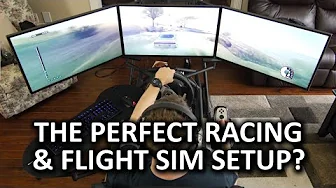
The video opens with Linus explaining the original plan for the Obutto Revolution, which was to combine extreme productivity with a comprehensive gaming cockpit. He describes a surrounding three-monitor setup using LG 31 MU97 displays, noting the massive pixel real estate that outgrows current GPU capabilities for AAA titles. The host recounts the motivation to test the cockpit as a productivity hub first, while teasing upcoming gameplay with higher-end monitors like the Rog Swift PG278Q. He walks through the hardware stack that powers the showcase, including an Intel Core i7 5960x, 16GB of DDR4, and dual GTX 980s in SLI, to set the stage for a demanding, immersive experience. The mounting process is then demonstrated, with the G25 wheel being attached, the seat and pedal positions being tuned, and the shifter mounted after some trial and error, which leads to insights about the practicality and stability of the setup. Linus emphasizes that driving from a cockpit feels markedly different from desk driving, hinting at the need for more affordable motion compensation to fully realize the concept. As the video transitions to a flight simulation configuration, he removes the shifter and attaches a left-side throttle and a center joystick mount, explaining how this arrangement improves accessibility of the keyboard and mouse during mixed flight and driving gameplay. The segment closes with practical notes on the mounting tape’s strength, his initial impressions of flight sim fun, and an early verdict that the Obutto Revolution dramatically elevates the experience beyond traditional wheel setups. The final thoughts summarize the cockpit as an immensely versatile product that excels for racing and flight enthusiasts with a generous budget, while acknowledging space requirements and the difficulty of making it a daily workstation. He also teases future updates and invites viewers to join the forum for deeper discussions and community support, ending with a light-hearted nod to the potential for personal “cockpit ownership” and the thrill of high-end hardware experimentation.
Topics · technology · gaming · hardware · reviews · productivity · cinematic-production
Questions answered
- What monitors were used in the Obutto Revolution setup and why were they chosen?
- Three LG 31 MU97 monitors were used for a surround display to maximize screen real estate and provide immersive field of view, paired with a high-end PC to drive the multi-monitor configuration.
- Can the Obutto Revolution be easily converted between racing and flight setups, and what changes are involved?
- Yes, the Revolution supports modular mounts. To switch from racing to flight, the shifter is removed, a left-side throttle and center joystick mount are installed, and the keyboard/mouse tray is adjusted to keep controls accessible during flight or mixed gameplay.