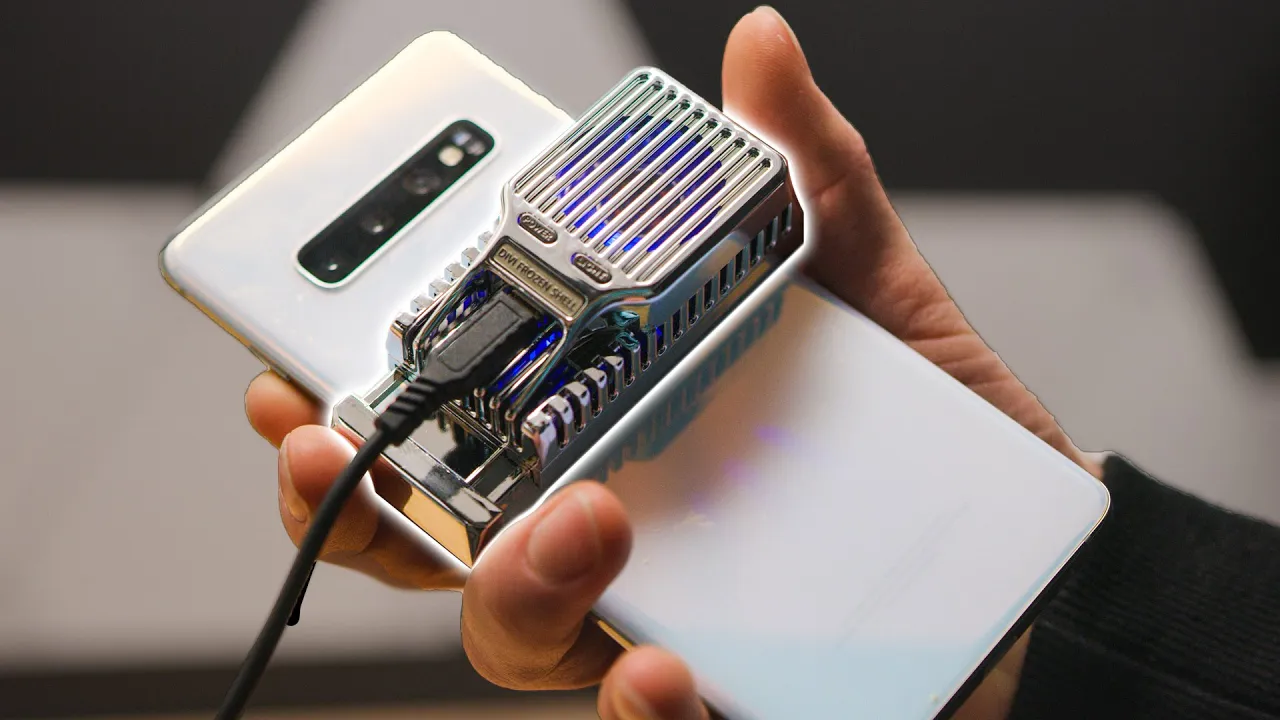
This weird thing made my phone faster...
0 up · 0 down · 0 ratings
Promos
Check out the DROP CTRL Mechanical Keyboard at dro.ps Antlion Audio ModMic USB: lmg.gg Antlion Audio ModMic Uni: lmg.gg Antlion Audio ModMic Wireless: lmg.gg What can you do if your phone keeps thermal throttling? We have a few ideas... Buy Samsung Galaxy S10+ on Amazon (PAID LINK): shop-links.co Buy Nubia Red Magic 3 on Amazon (PAID LINK): geni.us Purchases made through some store links may provide some compensation to Linus Media Group. Discuss on the forum: linustechtips.com Our Affiliates, Referral Programs, and Sponsors: lmg.gg Get a Displate Metal Print at lmg.gg Get a 30-day free trial of Amazon Prime at lmg.gg Linus Tech Tips merchandise at lttstore.com Our Test Benches on Amazon: amazon.com Our production gear: geni.us Come see us at LTX 2020: ltxexpo.com Twitter - twitter.com Facebook - @LinusTech Instagram - @linustech Twitch - twitch.tv Intro Screen Music Credit: Title: Laszlo - Supernova Video Link: youtube.com iTunes Download Link: itunes.apple.com Artist Link: soundcloud.com Outro Screen Music Credit: Approaching Nirvana - Sugar High youtube.com
This video explores why smartphones throttle their CPUs during gaming and heavy tasks, and evaluates two alternative cooling approaches that do not rely on full liquid cooling. The host contrasts a built-in cooling fan in the Nubia Red Magic 3 with a clip-on thermoelectric cooler (TEC) placed on the back of a Galaxy S10 Plus, aiming to keep the Snapdragon 855 from throttling. The discussion includes practical limitations of TEC cooling, such as heat rejection, power consumption, and the need for heat dissipation, alongside an explanation of how Peltier devices work to transfer heat using a voltage difference. Throughout the segments, the host sets up a consistent baseline by running 3DMark Fire Strike on the Galaxy S10 Plus and then proceeds to a controlled head-to-head test with both devices while monitoring temperatures and performance. The narrative frames the experiment as a test of feasibility and value, emphasizing that while the clip-on cooler offers a noticeable performance boost, it does not reach the effectiveness of an integrated cooling solution. The conclusion highlights a roughly ten percent improvement in gaming performance with the external cooler, while acknowledging drawbacks such as bulk, power draw, and the appearance of the setup. Viewers are left with a pragmatic takeaway: external cooling can help performance at a low cost and complexity, but is not a substitute for proper, built-in device cooling for sustained high-end gaming.
Topics · technology · mobile devices · hardware · cooling and thermodynamics · gaming hardware
Questions answered
- What is a thermoelectric cooler and how does it work in this phone cooling test?
- A thermoelectric cooler uses the Peltier effect to create a temperature difference by moving heat from one side to the other when voltage is applied, cooling the hot side (where the processor sits) and heating the cold side. In this test, the TEC is clipped to the back of the phone to remove heat from the processor area and then relies on a separate heatsink or air flow to dissipate that heat.
- Does the clip-on cooler perform as well as water cooling or built-in cooling on the phone?
- No, it does not match the performance of water cooling or devices with integrated cooling. It provides a noticeable improvement in sustained gaming performance but cannot match the effectiveness of purpose-built, built-in cooling solutions. It also introduces bulk, extra power consumption, and practical limitations.
- What was the measured impact on gaming performance in the test with the clip-on cooler?
- The test observed about a 10 percent increase in gaming performance when using the clip-on cooler compared to the baseline, with the Red Magic 3 configuration leading the results in the head-to-head test.”]}],