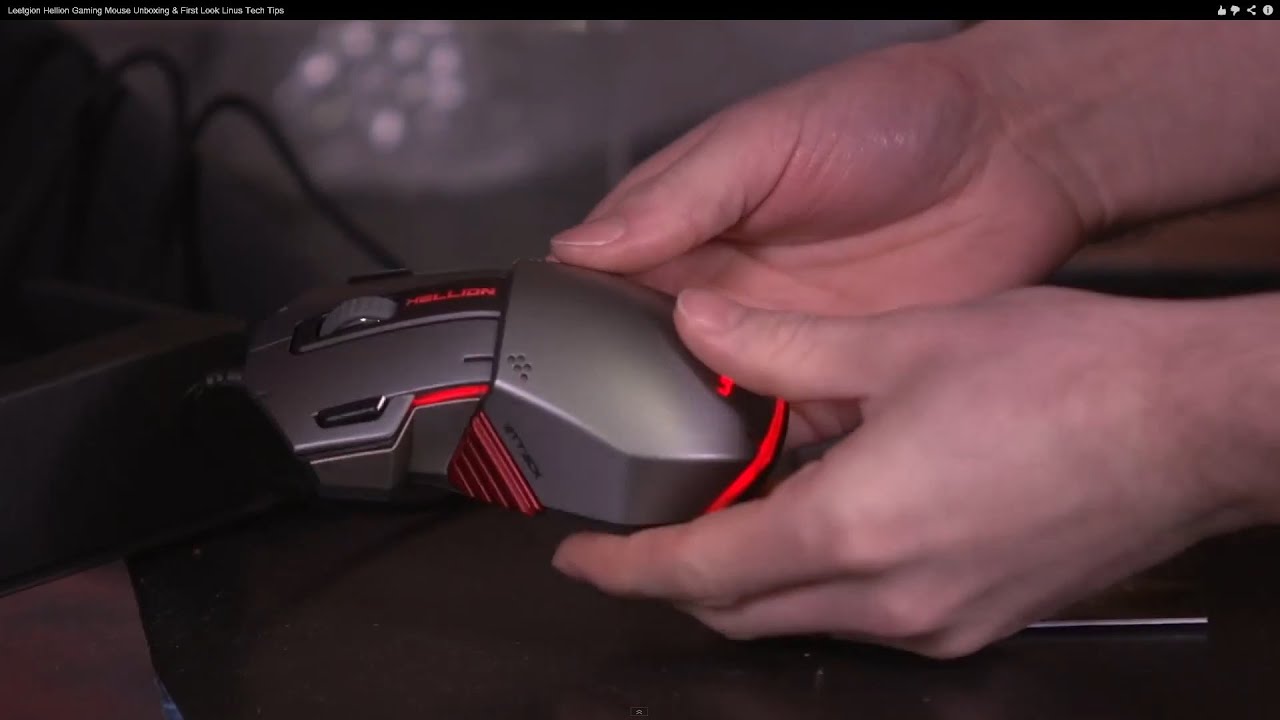
Leetgion Hellion Gaming Mouse Unboxing & First Look Linus Tech Tips
0 up · 0 down · 0 ratings
Channels and socials
Very unique mouse. never seen anything quite like the Leetgion Hellion. Read about this and join our forum: linustechtips.com twitter.com @LinusTech Buy at NCIX: ncix.com
The Leetgion Hellion gaming mouse is presented in a thorough unboxing and first look, emphasizing its high-end build, RTS-oriented design, and premium hardware choices. The host explains the meaning behind the LEET and Legion naming, and frames the Hellion as a product aimed at competitive RTS players with features such as a dedicated attack button and a profile dial on the bottom. He highlights the use of a high-end AOQ 9500 laser sensor, Omron switches, a Cherry MX Blue attack button, and replaceable slip pads from 3M, while noting the ambidextrous design and braided, gold-plated cord. The packaging is praised for its premium appearance and the device's internal customization options are demonstrated, including six programmable hotkeys and 16.8 million LED color options mapped to different profiles (Teran, Zerg, Protoss, and custom). The host demonstrates how the profile dial on the bottom changes the active settings without software and then describes the color-changing LEDs as visible through multiple indicators on the mouse, including the logo and side panels. In closing, the video reiterates the RTS optimization angle and invites viewers to subscribe for more unboxings, reviews, and computer videos from Linus Tech Tips. The overall impression is that Leetgion is serious about building high-end peripherals and delivering tangible customizability for gamers who want a Maka-like customization experience in a functional form factor.
Topics · technology · unboxing · peripherals · gaming · hardware_review · product_design
Questions answered
- What makes the Leetgion Hellion suitable for RTS gaming?
- It features a dedicated attack button with a Cherry MX Blue switch, six programmable hotkeys, and a bottom profile dial for quick switching between DPI/settings, all designed to support RTS gameplay and rapid input changes.
- How can the DPI and lighting profiles be adjusted on the Hellion?
- DPI and lighting profiles are managed via the bottom dial to switch between predefined profiles (Teran, Zerg, Protoss, Custom), with color-coded LED indicators for each DPI level and profile.