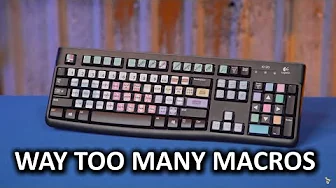
DIY 87-Key Macro Keyboard - Because he has too many keyboard shortcuts!
0 up · 0 down · 0 ratings
Channels and socials
Most keyboards have few to no macro keys. But what if you want a LOT of macro keys? Like, 87 of them? Well, you can, with this keyboard mod! TunnelBear message: TunnelBear is the easy-to-use VPN app for mobile and desktop. Visit tunnelbear.com to try it free and save 10% when you sign up for unlimited TunnelBear data. Intel link: linustechtips.com Pricing & discussion: linustechtips.com Luamacros: hidmacros.eu AutohotKey: autohotkey.com Here’s a link to all the code! github.com (Note that some filenames have changed.) Here’s a link to the keycap images, if you want to use them: dropbox.com Backup Imgur link: (not as good cause its a jpeg) i.imgur.com The Art of the Bodge (video): youtube.com 12 new Premiere Pro features, done with AutoHotKey: youtube.com Support us: linustechtips.com Join our community forum: bit.ly twitter.com @LinusTech Intro Screen Music Credit: Title: Laszlo - Supernova Video Link: youtube.com iTunes Download Link: itunes.apple.com Artist Link: soundcloud.com Outro Screen Music Credit: Approaching Nirvana - Sugar High youtube.com Sound effects (sometimes) provided by freesfx.co.uk
The video introduces a bold DIY project: converting an entire keyboard into 87 programmable macro keys. The creator explains the motivation behind needing rapid, repeatable actions for video editing workflows, especially inside Premiere Pro, where a large number of shortcuts are used daily. He walks through the concept of a second keyboard that acts as an independent input device, allowing each key to trigger its own AutoHotkey or LuaMacros script. The setup begins with discovering LuaMacros and AutoHotkey as essential tools, then proceeds to configuring a second keyboard so that the macros are intercepted and handled separately from the primary keyboard. The narrative emphasizes the challenge of remembering dozens of shortcuts and the potential productivity boost from a dedicated macro keyboard, while also noting the experimental nature of the solution and the iterative code development involved. The video concludes with practical tips on keycap labeling, hardware choices, and where to find the necessary code, inviting the community to experiment and improve the setup.
Topics · technology · productivity · do-it-yourself · hardware · software
Questions answered
- What is a keyboard macro in this context?
- A keyboard macro is a pre programmed sequence of keystrokes and mouse actions that can be triggered by a single key press to automate repetitive tasks.
- Which software tools are used to create and manage the macros?
- LuaMacros is used to intercept input from the second keyboard, and AutoHotkey is used to run the associated scripts that perform the desired actions.
- What hardware is demonstrated for hosting the macros besides the main keyboard?
- The project uses a second keyboard as a dedicated input device for triggering macro scripts, with labeling and custom keycaps to organize functions.