HyperX Predator PCIe SSD, New DDR4 RAM & More - CES 2015
0 up · 0 down · 0 ratings
Channels and socials
Our CES 2015 Sponsors: Phantom Glass: store.phantom.glass HyperX YouTube Channel: youtube.com Forum thread: linustechtips.com twitter.com twitter.com @LinusTech Join our community forum: bit.ly
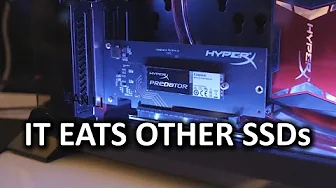
The video provides Linus Tech Tips’ CES 2015 coverage focusing on HyperX products shown at the event, including their Savage DDR3 memory kit and two high performance SSD options. The host notes the Kingston-backed Savage SSD series, powered by a Phison S10 controller, available in 240, 480, and 960 GB, and discusses performance figures around 560 MB/s read and 520–540 MB/s write, highlighting real-world behavior and competition with other drives in the market. The standout segment centers on HyperX Predator, an M.2 PCIe SSD with four PCIe lanes that delivers around 1.4 GB/s read and 1 GB/s write, available in 240, 480, and 960 GB capacities, and could be installed directly in an M.2 slot or via a PCIe riser card in any motherboard. The presenter also mentions possible cosmetic variations for the PCB and emphasizes gaming-focused design and performance alongside Kingston branding. The coverage closes with a light, self-deprecating aside about sponsorships from Phantom Glass and HyperX, encouraging viewers to subscribe for more CES updates while continuing to provide hands-on impressions of the showcased hardware.
Topics · technology · hardware · event_coverage · product_review
Questions answered
- What performance figures are quoted for the HyperX Savage SSD and the HyperX Predator M.2 PCIe SSD?
- The HyperX Savage SSD shows about 560 MB/s read and 520–540 MB/s write, while the HyperX Predator M.2 PCIe SSD delivers around 1.4 GB/s read and 1 GB/s write.
- How can the HyperX Predator M.2 PCIe SSD be installed in a system lacking an M.2 slot?
- It can be installed directly in an M.2 slot on a compatible motherboard or used with a PCI Express riser card to fit into a standard PCIe slot.