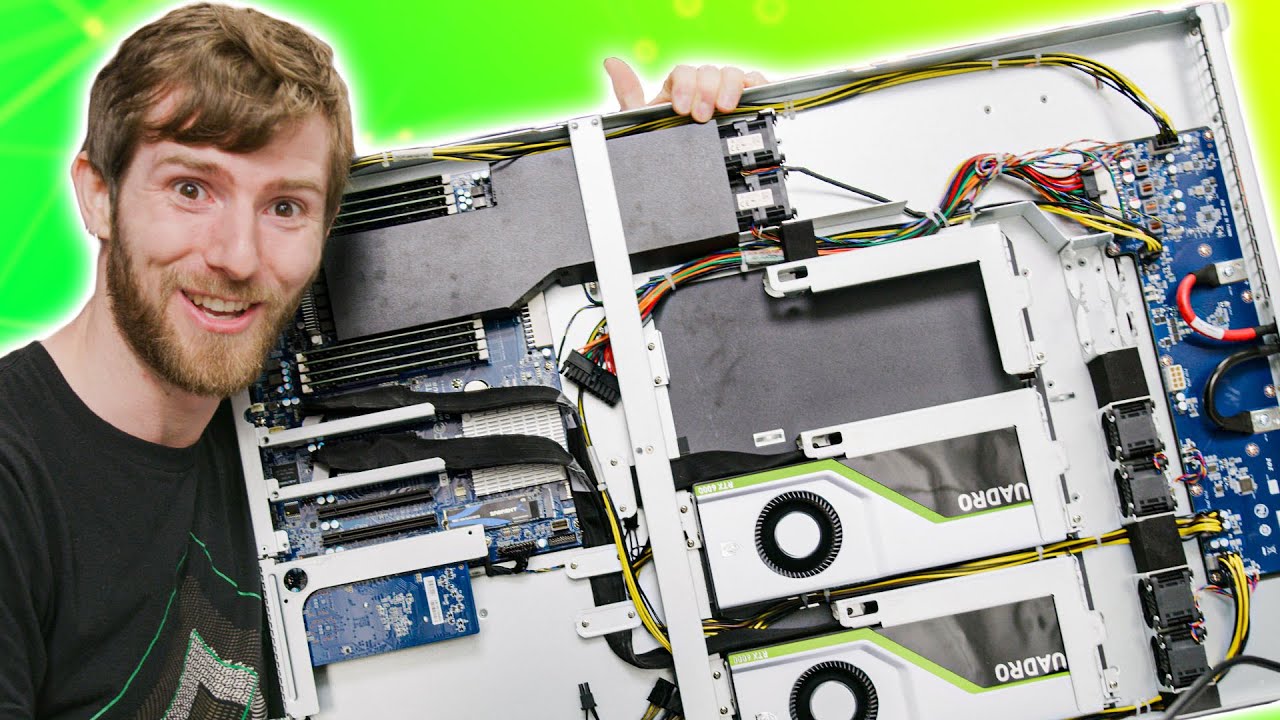
What the heck is a GAMING SERVER??
0 up · 0 down · 0 ratings
Description
Thanks to Shadow for sponsoring today's video! Check them out at lmg.gg Cloud gaming is getting more popular, and we're not strangers in how they work, but have you actually thought about what the hardware looks like when you play games or whatever on them? We convinced Shadow to send us one of their units, and they actually agreed to it... I hope they knew what they were agreeing to.
Promos
Check out the video where we toured their office and even their data center at youtu.be Buy Seasonic Power Supply On Amazon (PAID LINK): geni.us On NewEgg (PAID LINK): geni.us On BHPhoto (PAID LINK): geni.us Buy NVIDIA Graphics Cards On Amazon (PAID LINK): geni.us On NewEgg (PAID LINK): geni.us On BHPhoto (PAID LINK): geni.us Buy Sabrent 2TB M.2 NVME Storage On Amazon (PAID LINK): geni.us On NewEgg (PAID LINK): geni.us On BHPhoto (PAID Link): geni.us Purchases made through some store links may provide some compensation to Linus Media Group. Discuss on the forum: linustechtips.com GET MERCH: lttstore.com SUPPORT US ON FLOATPLANE: floatplane.com LTX EXPO: ltxexpo.com AFFILIATES & REFERRALS --------------------------------------------------- Affiliates, Sponsors & Referrals: lmg.gg Get Private Internet Access VPN at lmg.gg Get a Mech Keyboard: geni.us NEEDforSEAT Gaming Chairs: geni.us Get a Displate Metal Print at lmg.gg Use code LINUSMEDIAGROUP on Epic Games Store: lmg.gg Get a 30-day free trial of Amazon Prime at lmg.gg Our Gear on Amazon: geni.us FOLLOW US ELSEWHERE --------------------------------------------------- Twitter: twitter.com Facebook: @LinusTech Instagram: @linustech Twitch: twitch.tv FOLLOW OUR OTHER CHANNELS --------------------------------------------------- Techquickie: lmg.gg TechLinked: lmg.gg ShortCircuit: lmg.gg LMG Clips: lmg.gg Channel Super Fun: lmg.gg Carpool Critics: lmg.gg MUSIC CREDIT --------------------------------------------------- Title: Laszlo - Supernova Video Link: youtube.com iTunes Download Link: itunes.apple.com Artist Link: soundcloud.com Outro Screen Music Credit: Approaching Nirvana - Sugar High youtube.com Monitor And Keyboard by vadimmihalkevich / CC BY 4.0 lmg.gg Mechanical RGB Keyboard by BigBrotherECE / CC BY 4.0 lmg.gg Mouse Gamer free Model By Oscar Creativo / CC BY 4.0 lmg.gg
The video begins with a sponsorship reveal from Shadow and a straightforward description of how cloud gaming services work. The host explains that you install Shadow’s app on a device, and you are instantly connected to a powerful Windows machine over the internet, which reframes the idea of cloud gaming as more than a buzzword. He proceeds to physically inspect a Shadow server unit, highlighting its hardware, open compute platform components, and the way power and cooling are centralized in a data center rather than in each individual machine. Throughout this exploration, the host emphasizes that the gaming experience hinges on low latency hardware and careful virtualization strategies so that multiple subscribers can share a single server without sacrificing performance. By examining the databoard, PCIe power rails, and the modular power architecture, he demonstrates how a single chassis can support multiple virtualized user environments while keeping costs manageable. The segment blends hands-on hardware curiosity with practical implications for gaming, design tasks, and video editing, making the case that Shadow’s offering is a real PC in the cloud rather than a simple streaming service. In the middle portion, the narrator details how Shadow allocates resources to each user. He shows that every subscriber effectively gets dedicated hardware, though virtualization may carve a CPU into multiple cores for different users. Memory bandwidth is described as multi-channel, with a total of 64 GB of RAM available in this demo configuration. The discussion then shifts to the platform’s open compute approach, where storage is kept off the individual server and centralized in the data center to prevent I/O bottlenecks. The host demonstrates basic setup steps, including booting from a local Windows installation on an M.2 drive and configuring the BIOS to run from PCIe, as well as considerations for network boot and avoiding storage bottlenecks. This practical walkthrough highlights how a cloud gaming server is assembled in a way that mirrors a high-end gaming PC while leveraging virtualization to serve multiple users. As the video progresses, the host tests the hardware by powering up and booting into Windows, then connects via a high-speed network link to a display. He documents the process of connecting a 10 gigabit Ethernet link and using breakout PCIe connectors, noting the challenges of cable management and the physical constraints of the chassis. Visual observations cover 240 Hz support in Shadow’s service and the ability to run games locally through the server while streaming to an Android TV box, a display, or a PC. The host plays several titles, including Overcooked 2 and Tomb Raider, to evaluate latency and image quality, pointing out that while some visual artifacts can appear in certain gradients, the overall image quality remains surprisingly solid for remote gaming. He emphasizes that latency, more than raw image fidelity, is the critical factor for fast-paced games, and he concludes that Shadow’s value proposition remains compelling given the current hardware price and the convenience of remote access. In closing, the host notes ongoing improvements, such as upcoming mouse and keyboard support and potential VR integration, and advises viewers to stay tuned for updates and more hands-on content. The video wraps with a practical takeaway: Shadow offers a unique hardware proposition in the cloud, and its benefits scale with proximity to data centers and network quality. The host reiterates the main trade-off between latency and convenience, arguing that for many users the economics of $40 per month for a complete gaming PC in the cloud can be attractive, especially when local hardware would be prohibitively expensive or impractical to upgrade. He also shares tips about future tiers and how to secure access, highlighting that activation and availability can vary by region. Overall, the segment blends technical teardown with real-world usability, concluding that Shadow represents a notable and evolving approach to cloud gaming that deserves attention from enthusiasts who want flexible, remote compute power for gaming and beyond.
Topics · science_technology · gaming · cloud_computing · hardware · data_center · virtualization
Questions answered
- What exactly is a gaming server in the Shadow cloud gaming system?
- A gaming server in Shadow is a remotely accessible Windows PC hosted in a data center, shared among subscribers via virtualization, with high-end GPUs and centralized storage to deliver a native-like gaming experience over the internet.
- How does Shadow manage hardware for multiple users on the same server?
- Shadow partitions CPU cores, memory, and GPU access through virtualization so several users can share a server, while dedicated hardware resources are allocated per user to maintain performance.
- What are the key limitations of cloud gaming servers like Shadow, based on the video?
- Latency remains the primary limitation for fast-paced titles, and while image quality can be good, gradient-heavy scenes may reveal compression artifacts; proximity to a data center also influences performance.
- What future improvements does Shadow mention?
- Shadow hints at upcoming mouse and keyboard support, iOS 14 integration, and VR support, with ongoing server and hardware improvements to enhance latency, access, and usability.