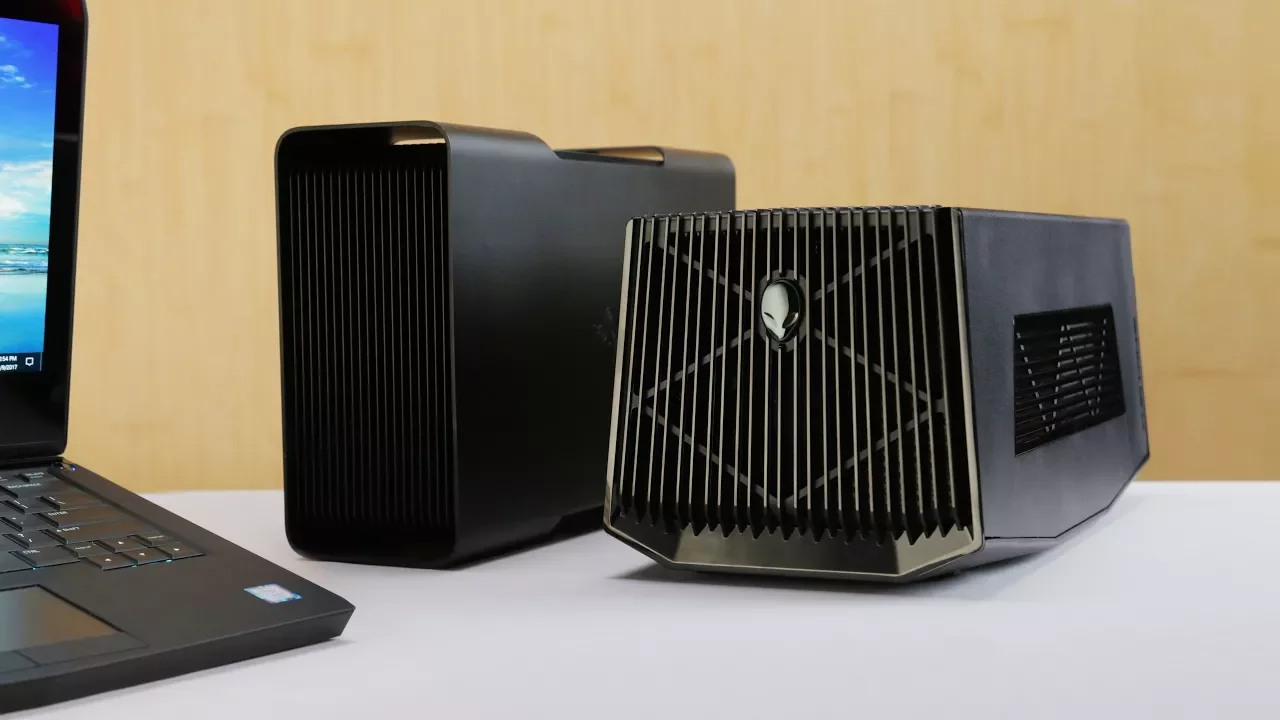
Best Desktop Graphics for your Laptop - Proprietary vs. Thunderbolt!
0 up · 0 down · 0 ratings
Promos
This video is sponsored by Fiverr. The first 300 viewers who use code LINUS will get 20% off! bit.ly
Check out bequiet's Purebase 600: Canada: goo.gl USA: goo.gl The ultimate showdown between the Razer Core and the Alienware Graphics Amplifier, but which external GPU solution will come out on top? Buy the Graphics Amplifier on Amazon: geni.us Buy the Graphics Amplifier on Newegg: geni.us Discuss on the forum: linustechtips.com Our Affiliates, Referral Programs, and Sponsors: linustechtips.com Linus Tech Tips merchandise at designbyhumans.com Linus Tech Tips posters at crowdmade.com Production gear: geni.us twitter.com @LinusTech Intro Screen Music Credit: Title: Laszlo - Supernova Video Link: youtube.com iTunes Download Link: itunes.apple.com Artist Link: soundcloud.com Outro Screen Music Credit: Approaching Nirvana - Sugar High youtube.com Sound effects provided by freesfx.co.uk
The video compares two external GPU docking solutions for laptops, the Razer Core and the Alienware Graphics Amplifier, each paired with identically specced laptops and a GTX 1080 Ti. The host explains the aim is to remove the graphics card as a bottleneck so they can evaluate other factors like power delivery, build quality, and thermal management. Early on, the BeQuiet Pure Base 600 case is mentioned as a chassis option with good noise insulation and radiator compatibility, setting the stage for a broader discussion of enclosure design and cooling efficiency. The test setup emphasizes identical drivers, a high refresh rate 240 Hz display, and ten-run benchmarks to capture both average and minimum frame rates, highlighting not just peak performance but the minimums that affect playability. In the results, the Alienware Graphics Amplifier edges out in some titles while the Razer Core shines in minimum FPS, with the most notable differences arising from how each enclosure connects to the laptop and how bandwidth is allocated. The host then analyzes potential bottlenecks, including thermal throttling and PCIe lane sharing, using tools like Ida64 and GPU-Z to challenge the assumption that all enclosures perform the same. A key finding is that the Alienware’s direct PCIe connection to the CPU offers dedicated lanes, whereas the Razer Core routes graphics through the motherboard chipset, introducing potential contention with other motherboard resources. The conclusion weighs ease of use and price against raw performance, ultimately favoring the Razer Core for simple setup and Thunderbolt 3 compatibility, while acknowledging the Alienware option can deliver top-tier performance at a lower price when build quality and compatibility are acceptable. The video closes with practical buying advice, noting that external GPU solutions continue to evolve and that the best choice depends on whether a user prioritizes plug-and-play simplicity or maximum raw throughput, followed by a nod to the sponsor and related community discussions.
Topics · technology · hardware · consumer-electronics · gaming · external-gpus · laptop-docking · pcie · thunderbolt-3
Questions answered
- Welke factoren beïnvloeden de prestaties van externe GPU-dokken naast de grafische kaart zelf?
- Prestatie-variaties komen door factoren zoals de verbinding ( PCIe lanes direct versus via de chipset), bandbreedtebeperkingen via Thunderbolt 3, thermische throttling en de CPU/driver-omgeving in de laptop.
- Waarom kan de Razer Core soms beter functioneren dan de Alienware Graphics Amplifier ondanks vergelijkbare GPUs?
- De Razer Core gebruikt Thunderbolt 3 voor directe connectiviteit en heeft minder last van PCIe-lanen-delaying in vergelijking met de Alienware, wat resulteert in betere minimum FPS en eenvoudiger installatie.