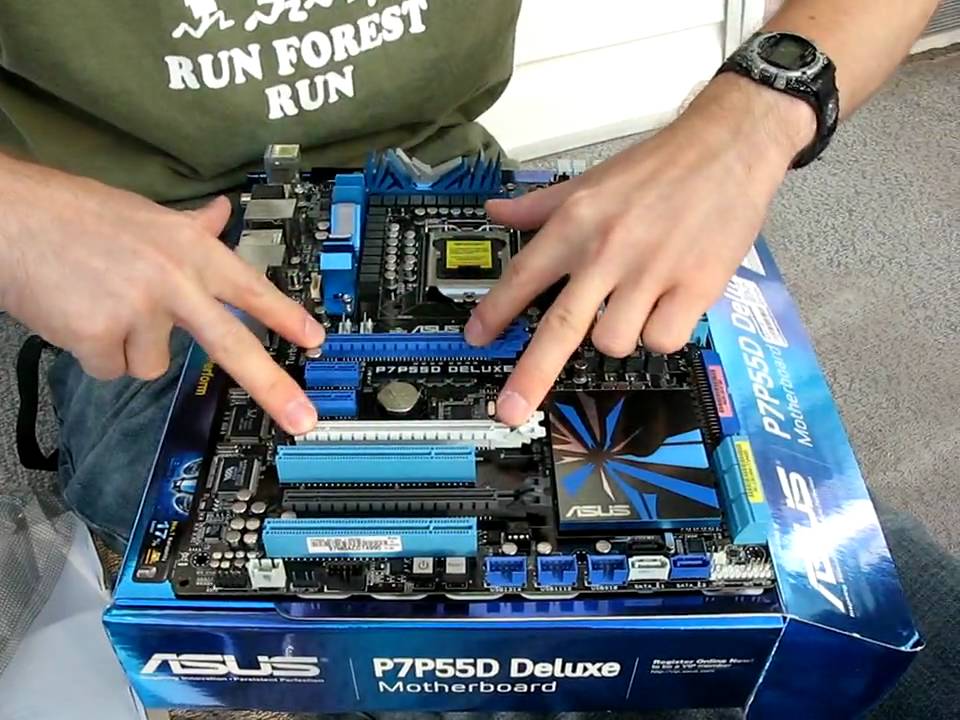
ASUS P7P55D Deluxe P55 LGA1156 Core i5 Motherboard Unboxing Linus Tech Tips
0 up · 0 down · 0 ratings
Description
The "Deluxe" level board has all the bells and whistles without the wicked colour scheme of the Maximus III Formula. Overall I think I'd go for the Maximus III Formula if I was spending this much on an ASUS P55 board.
The video provides a detailed unboxing and quick overview of the ASUS P7P55D Deluxe motherboard for the LGA1156 socket, highlighting its feature set and design. The presenter contrasts it with other P55 boards, noting the 16 plus three phase CPU power design as a stronger power delivery solution and mentions support for Drive Expert, an automatic drive backup feature. The unboxing sequence reveals the included accessories: Turbo V remote, IO Shield, manual and drivers, six SATA cables (three right-angle, three straight), USB and eSATA IO bracket, an SLI bridge, Q-connect USB and front-panel connectors, and an IDE cable. The board’s layout is described in depth, including dual PCIe x16 slots yielding 8x8 when running two cards, a fourth slot at 4x, and a distinctive heatsink on the chipset area with a heat pipe cooler. Attention is given to onboard controls like memory/uncore/CPU overvoltage toggles, power connectors, and the Turbo connector that interfaces with the back IO shield, along with a back panel featuring eight USB ports, digital audio, Ethernet, FireWire, and 7.1 audio; notable absence of on-board SATA ports is mentioned as unusual for a premium board. The overall impression emphasizes a cohesive ASUS design language and a feature-rich package, though the presenter notes a preference for a different ASUS model in this price range, concluding that the Deluxe version offers compelling features with a visually appealing aesthetic.
Topics · computers · hardware · unboxing · technology · pc-build
Questions answered
- What is the Turbo V remote and what does it do on the ASUS P7P55D Deluxe?
- The Turbo V remote is a hardware level overclocking tool that allows you to adjust CPU bus speed and apply presets directly from the motherboard without entering software in the OS.
- How are the PCIe slots configured on the ASUS P7P55D Deluxe and what are their lanes?
- The motherboard provides two PCIe x16 slots that run at 8x8 when using two graphics cards, and a third slot that operates at 4x electrical speed off the chipset.