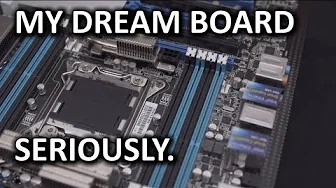
Asus P9X79-E WS Ultimate X79 Motherboard Unboxing & Overview
0 up · 0 down · 0 ratings
Channels and socials
The P9X79-E WS is my ultimate board. Everyone has a different opinion about what is "best", but to me, this is the one. I don't need fancy onboard audio (I have my own discrete) and I don't need gaming LAN (got my own NIC). What I need is ultimate expansion and compatibility with fantastic quality. Turns out that costs $500, but I guess you get what you pay for... Sponsor link: linustechtips.com Pricing & availability: linustechtips.com Join our community forum: bit.ly twitter.com @LinusTech Intro Screen Music Credit: Adhesive Wombat -
Check out his channel here: youtube.com Outtro Screen Music Credit: Approaching Nirvana - Sugar High youtube.com
The video opens with an enthusiastic unboxing of the Asus P9X79-E WS Ultimate X79 motherboard, highlighting its positioning as a workstation-grade board that goes beyond typical gaming or consumer-class features. The host points out that while it can still overclock and run demanding graphics, its value lies in expanded expansion capabilities and robust componentry, including support for Zeon processors and ECC memory. He notes that the motherboard is validated to work with Nvidia Tesla compute cards and mentions the unusual but notable four-way SLI/Crossfire capability at 16x link speeds, which sets it apart from more mainstream boards. The review then dives into the accessory bundle, detailing the IO shield, four-way SLI bridge, firewire and USB 2.0 headers, SATA cables, Molex-to-dual-SATA adapter, and a serial port riser, emphasizing how comprehensive the package is for high-end builds. As the host explores the layout, he explains the expansive PCIe configuration, dual Intel network controllers, integrated USB 3, and the unique front-panel USB/EPUs options, all while describing the cooling solution that uses heat pipes to distribute heat across the MOSFETs and VRMs. He concludes by articulating clear target users for this board, from multimedia producers using Quadros and Teslas to hyper-accurate video editing rigs, and teases a future Ultimate Build guide that will showcase a complete high-end video editing workstation built around this motherboard.
Topics · technology · hardware · computer-hardware · unboxing · workstation
Questions answered
- What makes the Asus P9X79-E WS notable for workstation builds?
- Its validation with Nvidia Tesla cards, ECC memory support, dual Intel NICs, and the ability to run four PCIe devices at 16x links make it highly suitable for professional workloads like video editing, computational work, and complex multi-GPU configurations.
- Can this motherboard support high-end gaming GPUs and maintain performance?
- Yes, it supports four-way SLI or Crossfire with 16x bandwidth on the primary slots, though the configuration splits into 8x8x when multiple cards are populated, while still delivering high throughput for demanding tasks.