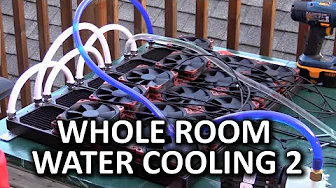
Whole Room Water Cooling Part 2 - The Assembly
0 up · 0 down · 0 ratings
Channels and socials
I came up with a bit of a crazy idea... Water cooling a room full of editing workstations on a single loop and removing the heat from the room by placing the radiators outside. Here is part two of this adventure... Sponsor link: linustechtips.com Pricing & discussion: linustechtips.com Support us: linustechtips.com Join our community forum: bit.ly twitter.com @LinusTech Title: LVTHER - One Look (feat. Mammals) Video Link: youtube.com Beatport Download Link: beatport.com Label Channel: youtube.com Approaching Nirvana - Virtual Is Where We Live Channel: youtube.com iTunes: bit.ly Title: Hellberg - I'm Not Over (Radio Edit) [feat. Tash] Video Link: youtube.com Beatport Download Link: beatport.com Label Channel: youtube.com Title: Grant Bowtie - Clockwork Video Link: youtube.com Beatport Download Link: beatport.com Label Channel: youtube.com
Part two of the whole room water cooling project follows the assembly phase where the team shifts from planning to physical build. The opening segment outlines the core concept: liquid cooling five editing workstations on a single loop and routing the heat outside the building to keep both the computers and the room cooler. They discuss the frame, fittings, and the practical challenge of mounting radiators, even joking about needing to visit Home Depot and possibly securing a ladder for proper installation. The team emphasizes component selection aimed at reliability and performance, detailing CPUs with six cores, fast but stable X79 motherboards, and a balanced memory configuration. They also describe the switch from originally requested GPUs to Titan Black cards, driven by cooling compatibility and double-precision considerations, along with power supplies that provide ample headroom without sacrificing efficiency. A key theme is the trade-off between compact, office-friendly hardware and the heat management required for a high-performance, multi-system setup. By the end of this segment, the plan shifts to assembling and mounting radiators, testing leaks, and preparing the systems for a post-assembly power-on to verify memory and component detection. The tone combines technical explanation with hands-on problem solving and team dynamics, highlighting both the camaraderie and the learning curve of executing a project of this scale in an office setting.
Topics · technology · hardware · diy · pc_build · cooling · office
Questions answered
- Why did the team switch from GTX 780 to Titan Black GPUs for this build?
- Nvidia provided Titan Black GPUs with water cooling support for the reference PCB, and the team needed double precision and sufficient memory for video rendering workloads, making Titan Black a more suitable choice.
- What major mounting challenge did the team face with the radiators?
- They initially planned to hang radiators from the window fascia, but after assembly realized the setup could not bear the weight once filled with water, so they adapted by mounting the radiators on a frame with multiple Home Depot trips to source materials.