Insane Eyefinity Surround Testing - 10320x1440 Resolution - Part 2
0 up · 0 down · 0 ratings
Channels and socials
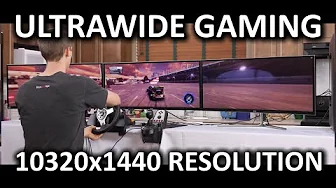
We're back with the follow-up video for our insane 14.86 megapixel eyefinity display setup, and today's goal is to answer one question - can you actually game on this thing? Sponsor link: linustechtips.com Pricing & discussion: linustechtips.com Support us: linustechtips.com Join our community forum: bit.ly twitter.com @LinusTech Intro Screen Music Credit: Adhesive Wombat -
Check out his channel here: youtube.com Outro Screen Music Credit: Approaching Nirvana - Sugar High youtube.com
In this Part 2 installment, the focus is on gaming performance at an extreme eyefinity setup, using three Radeon R9290X GPUs in crossfire to drive a 10320x1440 multi-monitor surround. The host explains the context and goals, noting that the display configuration stretches far beyond standard gaming resolutions and asks whether modern titles can still render smoothly across the expansive surface. The video walks through a curated selection of games spanning racing simulators, action RPGs, strategy, and shooters to gauge framerate, input responsiveness, and visual fidelity under ultra-wide, multi-monitor conditions. Early sections outline the hardware stack, including a Core i7 5930K overclocked to 4.7 GHz, 32 GB of DDR4 RAM, an ASUS Rampage V Extreme, a 1500 watt PSU, and cooling to handle the power draw of triple GPUs. The narrative emphasizes practical experience: menus and UI scaling, field of view, and crossfire behavior as critical factors that affect whether the experience is smooth or frustrating, especially given the extreme horizontal spread. By presenting observed FPS, texture details, and hindrances across each title, the host aims to provide a grounded assessment of when and how this kind of setup makes sense for gaming rather than just spectacle.
Topics · technology · gaming · hardware · multimonitor · benchmarking · surround · ultrawide
Questions answered
- What hardware enables the triple GPU eyefinity test setup?
- The setup uses three Sapphire Vapor X Radeon R9290X 8 GB graphics cards in crossfire, paired with a Core i7 5930K at 4.7 GHz, 32 GB DDR4 RAM, an ASUS Rampage V Extreme motherboard, and a 1500 W power supply.
- Which game ran the smoothest and which highlighted the biggest navigation challenges in this setup?
- Dirt Showdown ran at around 52 FPS at ultra with two times MSAA, showing strong performance, while Shadow of Mordor demonstrated menu navigation issues across the extended display, illustrating UI and VRAM stress in multi-monitor configurations.