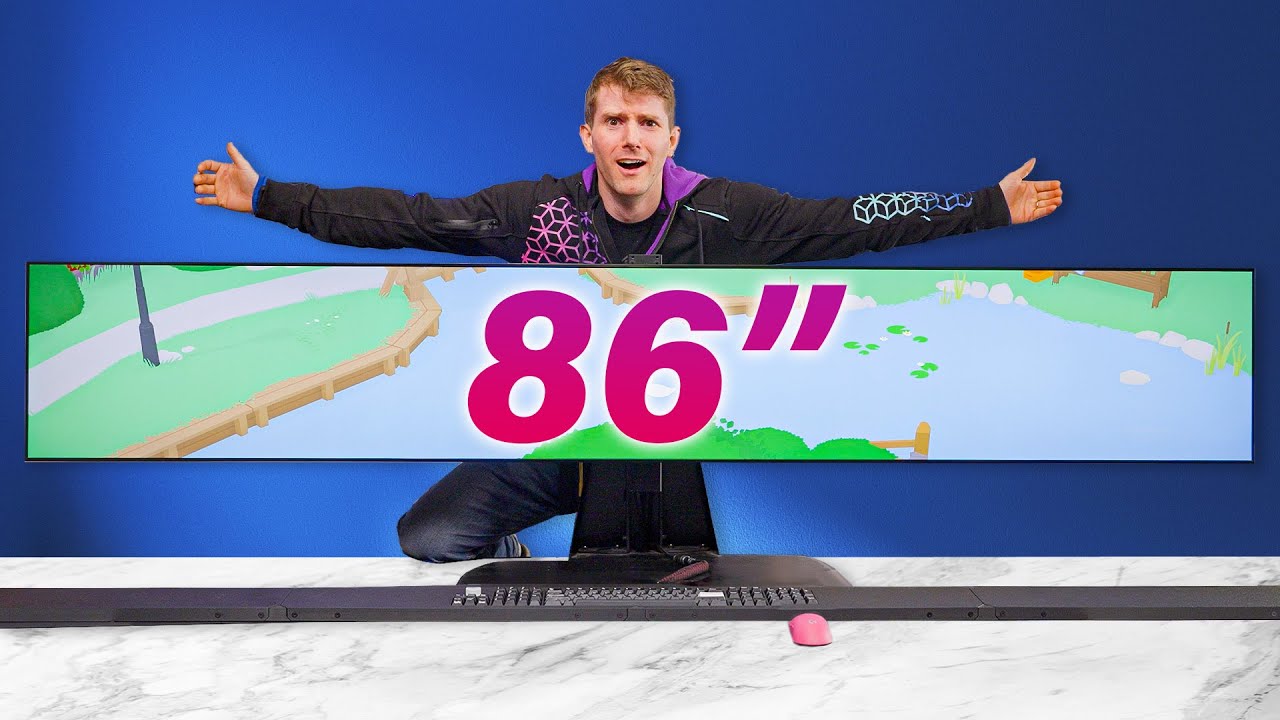
The Wiiiiiiiiiiiiiiide Gaming Setup
0 up · 0 down · 0 ratings
Promos
Check out Pikatea for silly keyboards: pikatea.com Purchases made through some store links may provide some compensation to Linus Media Group. ► GET MERCH: lttstore.com ► GET EXCLUSIVE CONTENT ON FLOATPLANE: lmg.gg ► SPONSORS, AFFILIATES, AND PARTNERS: lmg.gg ► EQUIPMENT WE USE TO FILM LTT: lmg.gg ► OUR WAN PODCAST GEAR: lmg.gg FOLLOW US --------------------------------------------------- Twitter: twitter.com Facebook: @LinusTech Instagram: @linustech TikTok: @linustech Twitch: twitch.tv MUSIC CREDIT --------------------------------------------------- Intro: Laszlo - Supernova Video Link: youtube.com iTunes Download Link: itunes.apple.com Artist Link: soundcloud.com Outro: Approaching Nirvana - Sugar High Video Link: youtube.com Listen on Spotify: spoti.fi Artist Link: youtube.com Intro animation by MBarek Abdelwassaa @mbarek_abdel Monitor And Keyboard by vadimmihalkevich / CC BY 4.0 geni.us Mechanical RGB Keyboard by BigBrotherECE / CC BY 4.0 geni.us Mouse Gamer free Model By Oscar Creativo / CC BY 4.0 geni.us CHAPTERS --------------------------------------------------- 0:00 Intro 1:19 The Loooooooong setup 1:52 What is "Digital Signage"? 4:14 CounterStrike 2 and F1 6:11 WideScreen Gaming Woes 7:10 Quake II 7:46 Mario's Widescreen Adventure 10:22 All 3D games are widescreenable? 10:56 PSP, but wider 12:35 Max Payne is short (for Maximum Payne) 13:24 Hitman: Blood Money (ran out for ultrawide support) 14:21 Hacky Widescreen Fixes: A History 16:48 Horz+, Vert-, and Worms WMD 18:07 Borderlands and Battlefront 2 19:43 HUDS and UI 21:16 Geese, Blizzards, and Conclusions
Channels and socials
Join us in War Thunder for FREE at playwt.link Get an exclusive bonus using our link - thanks for supporting the channel! The 86" LG Ultra Stretch Digital Signage Display has an aspect ratio of 58:9, making it relatively wider than just about any other display we've tried to game on. How well does it game? The answer is more interesting than you might think, and depends much more on how the game was made than when. Discuss on the forum: linustechtips.com If you want to buy one (spoiler alert: you probably don't), here's the product page: lg.com
The video opens by presenting the 86-inch LG Ultra Stretch display and immediately establishes its extreme aspect ratio as a novelty for gaming, noting that it dwarfs traditional ultrawide monitors in both width and vertical resolution. The host explains why such a display is marketed as signage rather than a consumer gaming device, yet demonstrates its potential by pairing it with modern and classic titles to explore how well wide formats can render. Early on, practical issues surface: the display’s low vertical resolution and absence of HDR create a unique challenge for legibility and UI density, while ergonomics and perspective require a new approach to gaming on such a wide canvas. The discussion then pivots to how 3D and 2D games adapt, highlighting how scalable rendering and ROM hacks or cheats can help extend widescreen support across eras of gaming. Throughout the segment, the host switches between real gameplay, demonstrations of emulation, and thought experiments about what it would take for developers to natively support extreme aspect ratios, balancing cost, testing, and user experience. As the video progresses, the host dives into the historical context of widescreen gaming, showing how older titles were frequently stretched or cropped when pushed to wider displays. The exploration includes concrete examples such as Quake II, PSP emulation, and retro titles like Super Mario World, illustrating both how well certain games adapt and where the limitations become glaring. The narrative emphasizes that many games from the 1990s and early 2000s relied on fixed aspect ratios, making true widescreen support costly or impractical for publishers. Viewers are treated to detailed explanations of how developers used scalable rendering versus fixed pipelines, including references to memory constraints and the evolution from 2D scaling to 3D, which underpins why some games look decent in widescreen while others look distorted or misaligned. The host then tests specific games to quantify the experience: racing and action games demonstrate how horizontal expansion can improve or ruin immersion depending on the engine, while UI and HUD elements reveal new usability challenges when stretched. Emulation is showcased as a practical path to achieving widescreen in titles that otherwise lack native support, with demonstrations of how to adjust cheat files, aspect ratios, and in-game menus. The discussion expands to the workflow realities of the era, noting how community resources from the WSGF and related forums helped players hack or patch games for better widescreen playback, even when such fixes were unofficial or risky. In wrapping up, the host synthesizes the takeaway: while ultra-wide setups can be visually impressive and offer a unique viewpoint, they are not universally practical, and modern titles generally offer better native support, reducing the need for retrofitted fixes. In conclusion, the video emphasizes that the widest displays are fascinating experiments that shed light on the evolution of game design and display tech. The host candidly acknowledges the limitations imposed by 600-pixel tall verticals, the readout quality of on-screen menus, and the distribution of proper widescreen support across generations. By juxtaposing real gameplay with historical hacks and current hardware, the video encourages viewers to appreciate the progress in display technology while recognizing that personal preference, game choice, and tolerance for workaround solutions determine whether such a setup is worth pursuing. The closing notes reiterate the potential value of modern native widescreen support and tease future coverage of related topics and other ultra-wide experiments. The overall takeaway is balanced: the experience is visually striking but not universally advantageous, and informed judging should weigh both technical constraints and individual gaming goals.
Topics · technology · gaming · display_hardware · emulation · retro_gaming
Questions answered
- Do ultra wide displays ever become a practical choice for gaming, or are they mostly a novelty?
- Ultra wide displays can offer immersive views and enhanced peripheral awareness for certain genres, but practicality depends on native support in games, hardware compatibility, and the ability to read HUD elements. For many titles, native support is still preferable to hacks or emulation workarounds.
- What are common methods to enable widescreen support in older games?
- Common methods include using scalable rendering where possible, editing configuration or ini files, applying ROM hacks or patches, and employing emulation with adjustable aspect ratios. In some cases, players relied on community tools to move or resize HUD elements to fit the extended screen area.
- What is a major challenge when converting 2D games to widescreen?
- A major challenge is that 2D tile-based graphics are memory constrained and designed for fixed aspect ratios, so widening the view often requires art asset rework or full engine changes, which many developers avoided due to cost and risk.
- Why might some games not benefit from ultra wide play even if technically possible?
- Some games rely on fixed camera work, HUD placement, or vertical detail that becomes unreadable at extreme widths, and in some cases the gameplay experience is hindered by distorted UI or unusable menus.
- How does hardware design influence the ability to render widescreen content in older titles?
- Hardware constraints such as memory limits (program and character memory), display timing, and the need to maintain performance impact how well a game can be scaled. Scalable rendering helped, but many engines were not designed for wide formats, leading to compromises.