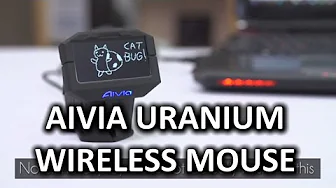
Gigabyte Aivia Uranium Wireless Gaming Mouse
0 up · 0 down · 0 ratings
Channels and socials
The Aivia Uranium wireless gaming mouse from Gigabyte has some seriously solid ideas and awesome technology in it, but needs a little bit more refinement before it finds its way to my mouse pad. With that said, getting around some of my issues with the product is as simple as going to the Gigabyte website and using their guide to determine if this product is right for you! Sponsor link: linustechtips.com Pricing & discussion: linustechtips.com Support us: linustechtips.com Join our community forum: bit.ly twitter.com @LinusTech Intro Screen Music Credit: Adhesive Wombat -
Check out his channel here: youtube.com Outro Screen Music Credit: Approaching Nirvana - Sugar High youtube.com
Gigabyte Aivia Uranium Wireless Gaming Mouse review delves into the standout Ghost Macro Station, a features panel with an on-device OLED display that lets you manage onboard macros and profiles without opening the software. The presenter highlights a 6500 DPI twin-eye laser sensor, a USB 2.0 compatible 1000 Hz polling rate, and an impressive battery life powered by two AA NiMH rechargeable packs, with a lightweight wired passthrough cable to keep the mouse usable while charging. Visuals cover the front charging port and the top controls, including a scroll wheel with tilt functionality and a wheel-lock that toggles between wheel mode and navigation, plus a profile switch and a DPI rocker. Ergonomics receive mixed treatment: the left-hand side buttons are accessible and well placed, while the right side and overall weight make palm grip more comfortable than claw grip, which could affect users with smaller hands. Software independence is a recurring theme, as the device can be tuned via the OLED display and onboard memory for macros, key mappings, and DPI settings, but the reviewer also notes a robust software suite that adds deeper customization when needed. In practice, the performance is described as smooth with no lag on high-resolution displays, and the live editing mode adds a dynamic way to navigate menus using the wheel as a D-pad, a feature praised for its immediacy and intuitiveness. The package includes extra feet, cleaning cloth, an Aivia club membership card, and documentation, underscoring Gigabyte’s attention to detail. The review continues with recommendations to verify personal fit through Gigabyte’s comfort guide online, and it closes with a balanced verdict: strong features and customization are offset by ergonomics for some users, making it a compelling option for those who prioritize wireless flexibility and macro-driven gaming. Overall, the Aivia Uranium stands out for its OLED macro control, onboard memory, and the ability to operate effectively as a wired mouse during charging, though prospective buyers should weigh weight and grip style against their preferred hold and game genre.
Topics · technology · gaming · peripherals · hardware · reviews
Questions answered
- What is the Ghost Macro Station and what can you do with it on the Gigabyte Aivia Uranium?
- The Ghost Macro Station is an onboard OLED display that lets you navigate menus, edit macros, adjust DPI, switch profiles, and configure remappings without launching software.
- What are the input and battery characteristics of the Aivia Uranium?
- It features a 6500 DPI twin-eye laser sensor, a 1000 Hz polling rate, and uses two NiMH rechargeable AA batteries for extended wireless use, with a lightweight charging cord for wired operation while charging.
- Is the Aivia Uranium comfortable for all grip styles?
- The reviewer notes that while the left-side buttons are easy to reach, the mouse is heavy and may not suit claw grip users; palm grip users with larger hands might find it more comfortable, so fit should be checked using Gigabyte’s comfort guide.