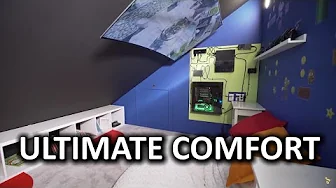
World's Most Comfortable Gaming Setup (Finale)
0 up · 0 down · 0 ratings
Channels and socials
This video was sponsored by Samsung. For more information on the SUHD TV, please visit bit.ly An empty room in Linus' house provided an incredibly unique opportunity... Creating the World's Most Comfortable Gaming Setup! Buy Samsung KS9500 4K Curved SUHD TV on Amazon: geni.us Buy Kanto F6080 on Amazon: geni.us Discuss on the forum: linustechtips.com Affiliates, referral programs, & sponsors: linustechtips.com Join our community forum: bit.ly twitter.com @LinusTech Eskimo Phur Pillowsac seat provided to us by Lovesac! Check them out here: bit.ly Intro Screen Music Credit: Title: Laszlo - Supernova Video Link: youtube.com iTunes Download Link: itunes.apple.com Artist Link: soundcloud.com Outro Screen Music Credit: Approaching Nirvana - Sugar High youtube.com Sound effects provided by freesfx.co.uk
The finale of the World’s Most Comfortable Gaming Setup series documents a dramatic room transformation centered on creating a high comfort, high immersion gaming and viewing environment. The host walks through the aftercare and finishing touches of the project, noting how insulation, drywall, flooring, and electrical work changed the room dramatically from its original state. A key focus is cable management, demonstrated by routing cables behind a back-wall setup with a 2-inch PVC conduit that feeds a Samsung KS9500 4K SUHD TV mounted securely to the ceiling area using the Kanto F680 wall mount. The build includes a custom wall-mounted PC housed in a lean aluminum chassis with sleeved green cables and RGB lighting, as well as a dedicated shelving niche for controllers and a USB charging hub. The host emphasizes the importance of safety and modularity, explaining that the wall was constructed to accommodate reconfigurations and additional devices, such as an Xbox One and network gear, while keeping the setup visually clean. The narrative then centers on the experiential payoff: a 4K HDR viewing and gaming experience with a curved screen positioned close enough for theater-like immersion, yet far enough to avoid eye strain, all within a family-friendly, cozy room design featuring a Lovesac pillow sack and a magnet wall for play. Throughout, the host highlights the TV’s on-board HDR capabilities, the advantages of Quantum Dot technology for color and brightness, and the practical considerations of mounting a heavy TV in a living space, while also sharing practical advice about mounting reliability and future upgrade paths. By the end, the host reflects on the overall success, calling the result one of the most comfortable and immersive movie watching and gaming experiences achieved, and encourages viewers to explore the linked gear and community resources. The video balances technical specs with practical execution, offering a tangible roadmap for viewers who want a similar setup without sacrificing room usability for family activities.
Topics · technology · home-theater · gaming-setup · consumer-electronics
Questions answered
- What mounting solution was used to secure the TV, and how much weight can it support?
- The TV was mounted using the Kanto F680 wall mount, which is rated to support up to 200 pounds and is anchored into wood roof supports for stability.
- Which TV and technology features are highlighted as part of the setup, and why were they chosen?
- The setup centers on a Samsung KS9500 4K SUHD TV with Quantum Dot technology for better color and brightness, HDR for improved detail in lights and darks, and a curved screen to enhance immersion at the viewing distance chosen.
- What role does the wall-mounted PC play in the setup?
- The wall-mounted PC provides a compact, powerful processing core connected to the display and peripherals, featuring an Intel Core i7 6700K, 16GB DDR4, and a GTX 1070, with sleeved cables and RGB lighting for aesthetics.