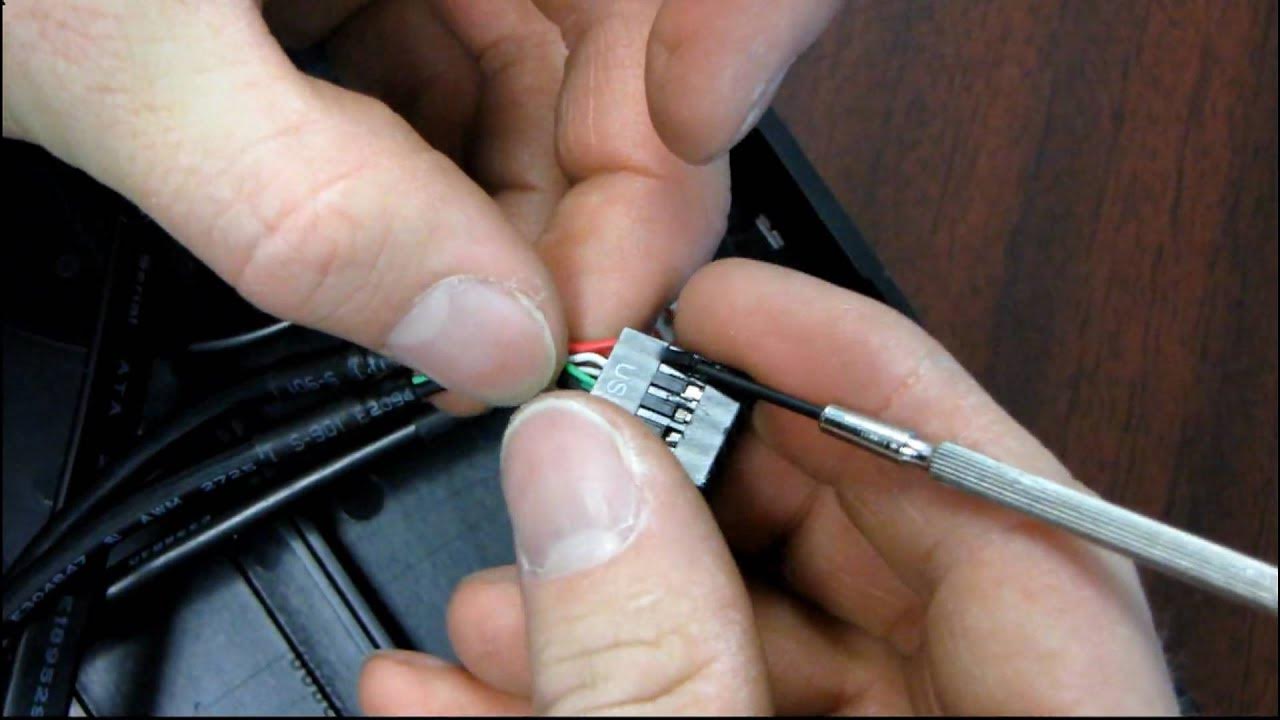
Fractal Design Front USB Wiring Repair Video for NCIX Customers Linus Tech Tips
0 up · 0 down · 0 ratings
Description
** NCIX RECOMMENDS WAITING FOR A REPLACEMENT CABLE ** This thread on our forum outlines a problem with a batch of Fractal Design Define R2 cases that was received by NCIX. forums.ncix.com If you need to test the front port to find out if your case is affected please use something like a generic mouse as in our testing mice have not been damaged by plugging into the incorrectly wired port, but NCIX does not take responsibility for any hardware damaged by using the front ports. This guide shows how to fix the problem if you don't want to wait.
This Linus Tech Tips video provides a concise, do-it-yourself repair walkthrough for a Fractal Design Define R2 case that suffers from a miswired front USB port. The presenter begins by explaining the issue and referencing a forum thread where users reported that the red and green wires in the USB header are swapped, which can render the front USB ports nonfunctional or harmful to connected devices. He notes that Fractal Design is addressing the problem by sending replacement cables, a process NCIX would forward to customers who bought the affected cases. As an alternative to waiting for a replacement, the video demonstrates a hands-on workaround: removing the front bezel after taking off the side panel, identifying the impacted USB header cable, and swapping the red and green conductors using a small flathead screwdriver or similar tool. The demonstration emphasizes caution to avoid lifting the plastic tabs too much, and it shows verifying that the wires are securely reinserted with the tabs locked in place. The final guidance reiterates that performing the swap is a viable solution for those comfortable with hardware tinkering, but for a guaranteed fix, waiting for the official replacement cable is recommended. Overall, the video balances practical repair steps with a warning about the potential risk to hardware if performed incorrectly, concluding with thanks for watching the quick guide. The piece serves as a practical reference for affected NCIX customers and Fractal Define R2 owners who want to restore proper USB functionality before a replacement part arrives, while also highlighting the supplier's corrective pathway. It emphasizes careful attention to routing and connector locking, and it contrasts the corrected wiring arrangement with the incorrect standard arrangement to illustrate the importance of proper cable orientation. The outcome is a clear, repeatable procedure that can save a failed front USB port from permanent damage, provided the viewer is cautious and precise in handling the delicate plastic tabs and connector housings.
Topics · computer_hardware · tech_tips · hardware_repair · pc_building
Questions answered
- What is the core problem with the Fractal Define R2 front USB port, and how can it be identified?
- The issue is that the red and green wires in the USB header are swapped, causing the front USB port to malfunction or risk damage. It can be identified by inspecting the USB header wiring and comparing it to the correct color-to-pin arrangement as demonstrated in the video.
- What is the recommended official fix versus a DIY workaround?
- The recommended fix is to wait for Fractal Design to provide replacement cables. As a DIY workaround, you can swap the red and green USB wires on the affected header and re-seat them securely, effectively correcting the miswiring without a replacement cable.
- What precautions should be taken when performing the DIY swap?
- Power down the system, remove the side panel and front bezel, and carefully use a small tool to lift the plastic tab while swapping the red and green wires. Ensure the wires are firmly seated and that the tabs are locked back into place to prevent dislodgement or damage.