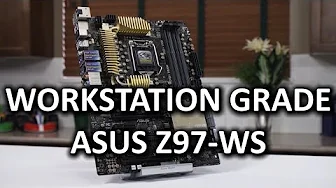
ASUS Z97-WS - As Good as it Gets IMO...
0 up · 0 down · 0 ratings
Channels and socials
The ASUS Z97-WS is the kind of product that really feels like it was "designed for me". No BS. Just rock solid. Edit: typo correction at 3:20 - This should be 105C, not 150C! Sponsor link: linustechtips.com Pricing & discussion: linustechtips.com Support us: linustechtips.com Join our community forum: bit.ly twitter.com @LinusTech Intro Screen Music Credit: Adhesive Wombat -
Check out his channel here: youtube.com Outro Screen Music Credit: Approaching Nirvana - Sugar High youtube.com
The video presents a focused examination of the ASUS Z97-WS motherboard, emphasizing a back-to-basics approach that trims superfluous features in favor of reliable, workstation-grade performance. The host articulates a preference for stability and practical design over flashiness, noting that ASUS deliberately limits the product to core capabilities that matter for consistent operation. He highlights the board’s broad expansion potential, including extensive PCIe connectivity and multi-GPU support, which positions it as a versatile platform for both workstation and high-end gaming builds. Throughout the tour, the speaker calls out the sturdy power design, high-quality Japanese capacitors rated for demanding temperatures, and robust BIOS tools that simplify overclocking and memory tuning. He also addresses small but meaningful compromises, such as the absence of onboard Thunderbolt by default, while praising the overall build quality and reliability that align with a professional workstation ethos. In conclusion, the Z97-WS is framed as a high-value, long-term investment for users who prioritize stable operation, future expansion, and predictable performance over consumer-focused bells and whistles.
Topics · technology · hardware · computer_components · motherboard
Questions answered
- What makes the ASUS Z97-WS stand out for workstation use compared to typical consumer boards?
- The Z97-WS emphasizes stability, robust power delivery, extensive expansion options including four PCIe Gen 3 x16 slots, and broad compatibility with various add-on cards for workstation tasks, which together provide reliable operation and future-proofing without extra consumer-oriented features that don’t get used.
- Does the motherboard include onboard Thunderbolt and what is the user impact of its absence?
- Onboard Thunderbolt is not included by default on this model; it can be added later via a PCIe add-in card. The absence is noted as a drawback for users who need integrated Thunderbolt, but it does not affect the core workstation capabilities such as PCIe expansion, memory overclocking, and overall reliability.