HD Tutorial: Mozilla Tunderbird RSS
0 up · 0 down · 0 ratings
Description
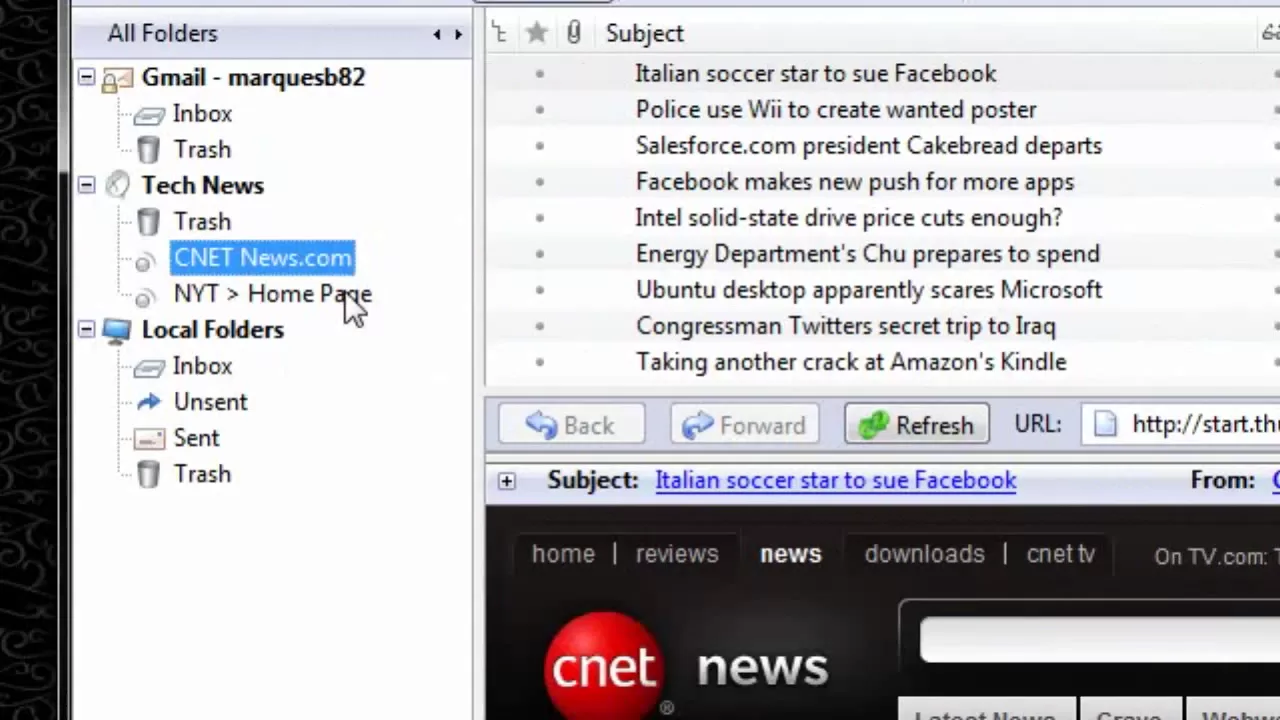
***WATCH IN HD*** In this tutorial, I show you how to subscribe to RSS feeds using Mozilla Thunderbird - no downloads or installations required. Just follow a few simple steps in HD, and you're get your news effortlessly with RSS! Enjoy - SUBSCRIBE
The video provides a concise, step-by-step walkthrough of subscribing to RSS feeds using Mozilla Thunderbird. It starts with creating a new RSS news and blog account via the File menu, then guides the viewer through identifying an RSS feed URL, typically ending in .xml, from a source like the New York Times homepage. After copying the feed URL, the presenter pastes it into Thunderbird's Subscribe Feed dialog, assigns a name such as Tech News, and selects options to store articles and display only a summary. The tutorial emphasizes that no additional downloads or installations are required, and shows how Thunderbird fetches and lists unread articles from subscribed feeds. The presenter also mentions the possibility of adding multiple feeds, such as a Google News RSS, and concludes by inviting viewers to request more tutorials, subscribe, and share topics they’d like covered. Overall, the video demonstrates a practical, quick method to manage RSS subscriptions within Thunderbird for keeping up with news content.
Topics · technology · tutorial · software · rss-feeds
Questions answered
- How do I add a new RSS feed account in Thunderbird?
- Open Thunderbird, choose File, then New, Account, select RSS News and Blog Account, give it a name, and finish the setup.
- How can I identify a valid RSS feed URL when browsing a site?
- Look for a URL that ends with .xml and copy that feed URL to paste into Thunderbird.
- Is it necessary to install anything extra to subscribe to RSS feeds in Thunderbird?
- No, the tutorial shows that you can subscribe and view RSS feeds directly within Thunderbird without additional installations.