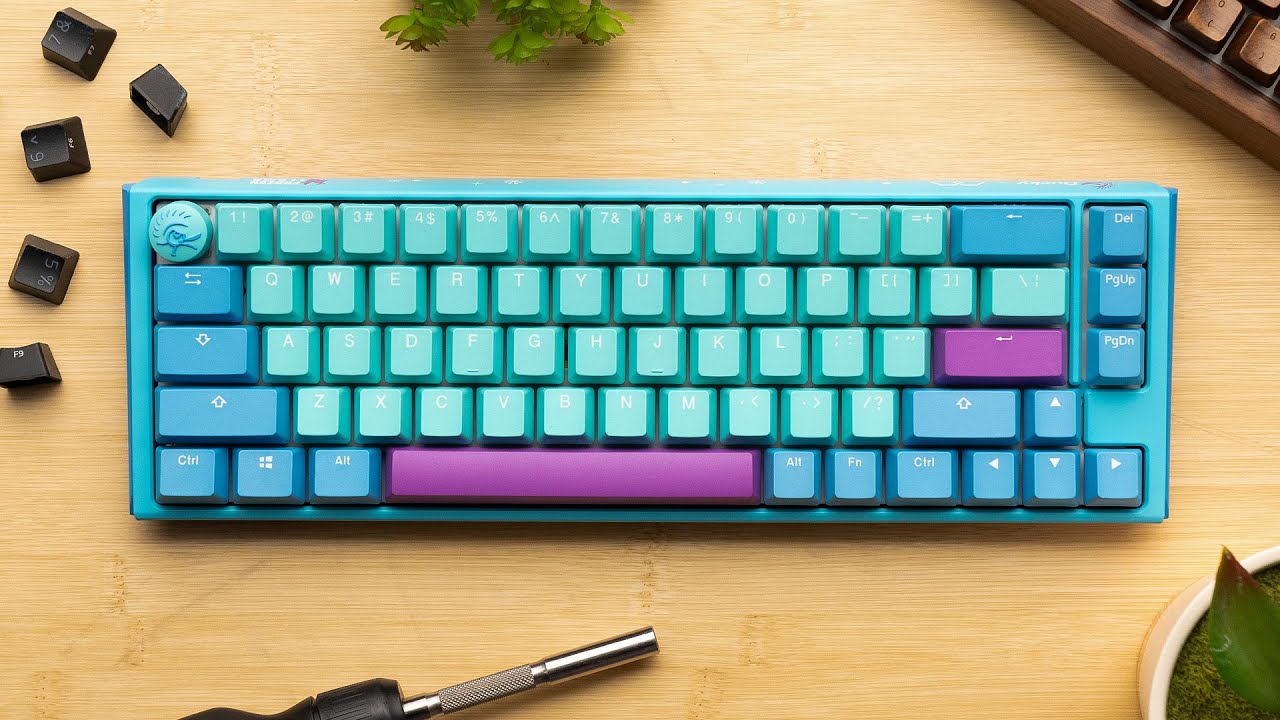
Build your own Mechanical Keyboard… the RIGHT Way
0 up · 0 down · 0 ratings
Description
Try Pulseway FREE today, and make IT monitoring simple at: lmg.gg Create your build at buildredux.com It’s been a few years and things have changed drastically in the mechanical keyboard space. Come follow along and find out if Linus will finally ditch Cherry Browns and prebuilt boards. Discuss on the forum: linustechtips.com
Check out the TOFU65 2.0 Kit: lmg.gg
Check out the TECSEE Purple Pandas Switches: lmg.gg
Promos
Check out Hamaji Neo: youtube.com ► GET MERCH: lttstore.com ► LTX 2023 TICKETS AVAILABLE NOW: lmg.gg ► GET EXCLUSIVE CONTENT ON FLOATPLANE: lmg.gg ► SPONSORS, AFFILIATES, AND PARTNERS: lmg.gg ► EQUIPMENT WE USE TO FILM LTT: lmg.gg ► OUR WAN PODCAST GEAR: lmg.gg FOLLOW US --------------------------------------------------- Twitter: twitter.com Facebook: @LinusTech Instagram: @linustech TikTok: @linustech Twitch: twitch.tv MUSIC CREDIT --------------------------------------------------- Intro: Laszlo - Supernova Video Link: youtube.com iTunes Download Link: itunes.apple.com Artist Link: soundcloud.com Outro: Approaching Nirvana - Sugar High Video Link: youtube.com Listen on Spotify: spoti.fi Artist Link: youtube.com Intro animation by MBarek Abdelwassaa @mbarek_abdel Monitor And Keyboard by vadimmihalkevich / CC BY 4.0 geni.us Mechanical RGB Keyboard by BigBrotherECE / CC BY 4.0 geni.us Mouse Gamer free Model By Oscar Creativo / CC BY 4.0 geni.us CHAPTERS --------------------------------------------------- 0:00 Intro 3:05 Kit Contents 4:05 PCB 5:35 Stabilizers 10:55 Foam 12:15 Plate 13:00 Switches 16:38 Gasket Mount 18:00 Final Assembly 19:45 Keycaps 22:40 Typing Test 24:54 Outro
This video is a thorough, step by step deep dive into building a custom mechanical keyboard using the Tofu65 2.0 kit from KBDfans. It starts with a broad overview of layout choices, explaining common sizes like 60, 65, 75, and 1800, and then settles on the Tofu65 2.0 as a middle ground that supports various mounting options. The host emphasizes the shift away from older tray mounts toward more modular mounting styles, including top mount, silicone gasket, and silicone bowl, which will all affect the feel and acoustics of the keyboard. We learn that hot swapping is a key feature of this kit, allowing switches to be changed without soldering, while soldering still offers advantages like potential stability and broader customization options. The video then moves into practical assembly steps, starting with stabilizers, discussing different stabilizer types, lubrication methods, and the consideration of holee mods for reducing rattle. The host demonstrates foam layering, plate choice, and the impact of plate materials on sound and rigidity, highlighting polycarbonate for a balanced, lower-pitched tone and comparing aluminum for stiffness and brightness. As the build progresses, switches are lubed using Krytox 205g0, with guidance on when to lube stems, rails, and springs, and the importance of switch films for stabilizing housings. The assembly continues with mounting the PCB into the case, plus a detailed look at gasket mounting using bowls and foam layers, followed by careful reassembly and final wiring. The video covers finishing touches like keycaps selection, including profiles such as Cherry, SA, XDA, and KAT, and discusses O-rings for dampening key presses. A typing test and final thoughts on the finish and sound complete the build, with a candid note on whether to pursue high-end or budget foam layers depending on the board. The host also teases additional resources, sponsor integrations, and a call to comment with questions or missed topics, ending with a recap that this is a customizable hobby where you can iterate indefinitely until you achieve the desired sound and feel.
Topics · technology · custom_hardware · how_to · education
Questions answered
- What mounting options are demonstrated for the Tofu65 2.0 kit and how do they affect sound and feel?
- The video demonstrates top mount, silicone gasket, and silicone bowl mounting. Each option changes the keyboard's rigidity and acoustic signature, with gasket and bowl mounting generally offering more dampening and a different bottoming feel compared to traditional top mount.
- Why is hot swapping highlighted as a valuable feature for beginners and enthusiasts?
- Hot swapping allows users to swap switches without soldering, enabling easy experimentation and gradual upgrading of feel and actuation force without committing to a single switch type.
- What materials are suggested for the plate and how do they influence sound?
- Polycarbonate is suggested for a lower-pitched sound with some flex, while aluminum offers stiffness and a brighter, higher-pitched tone; other options like FR4, POM, and brass are mentioned as common alternatives.
- What is the purpose of switch films in this build?
- Switch films fill gaps in the housing to reduce wobble and improve stability, contributing to a more solid feel and potentially clearer sound in some switches.
- How are stabilizers prepared and installed in this build?
- Stabilizers are lubricated, clipped or trimmed if necessary, and installed with the PCB using screws and washers to minimize rattle and ensure stability for larger keys.
- What considerations are given to keycaps and customization at the end of the build?
- Keycaps are chosen based on profile, material, and layout compatibility; options like PBT versus ABS are discussed, along with various profiles such as Cherry, SA, XDA, and KAT, plus the possibility of O-rings for dampening.