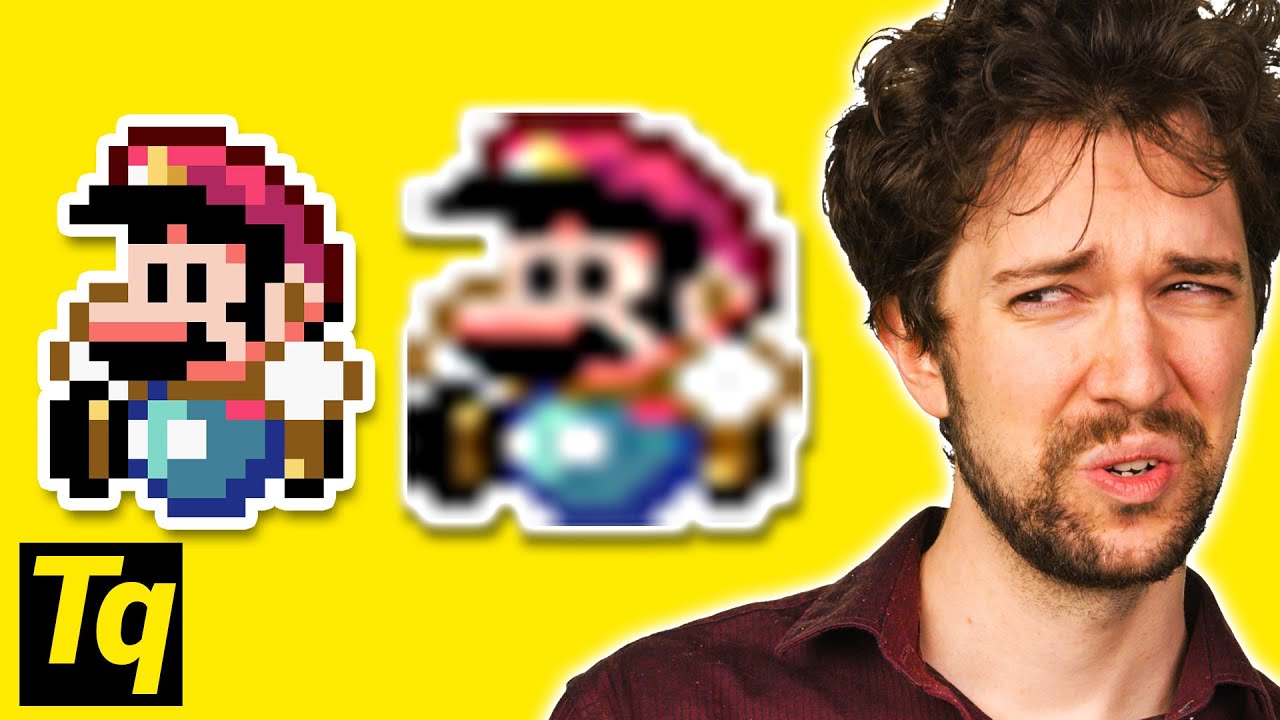
Why Old Games Look So BAD
0 up · 0 down · 0 ratings
Promos
Fix up your Nintendo Switch and more at ifixit.com Why does upscaling old games cause them to look blurry, when better alternatives exist? Further reading: tanalin.com (Free) RGB video Master Class from My Life in Gaming: youtube.com Leave a reply with your requests for future episodes, or tweet them here: twitter.com Buy a Super NES Classic On Amazon (PAID LINK): geni.us On Newegg (PAID LINK): geni.us GET MERCH: lttstore.com SUPPORT US ON FLOATPLANE: floatplane.com LTX EXPO: ltxexpo.com AFFILIATES & REFERRALS --------------------------------------------------- Affiliates, Sponsors & Referrals: lmg.gg Get Private Internet Access VPN at lmg.gg Get a Displate Metal Print at lmg.gg Support a Creator code LINUSMEDIAGROUP on Epic Games Store: lmg.gg Get a 30-day free trial of Amazon Prime at lmg.gg Our Test Benches on Amazon: lmg.gg Our Production Gear: lmg.gg FOLLOW US ELSEWHERE --------------------------------------------------- Twitter: twitter.com Facebook: @LinusTech Instagram: @linustech Twitch: twitch.tv FOLLOW OUR OTHER CHANNELS --------------------------------------------------- Linus Tech Tips: lmg.gg TechLinked: lmg.gg ShortCircuit: lmg.gg LMG Clips: lmg.gg Channel Super Fun: lmg.gg Carpool Critics: lmg.gg
The video explains why old games look blurry when viewed on modern 4K televisions and how upscaling works. It starts by noting the native resolutions of classic consoles like the SNES, and explains that upscaling is necessary to fill a 4K screen, which forces TVs to choose among several algorithms such as nearest neighbor, bilinear, bicubic, and lanczos. The presenter distinguishes how these methods affect pixel art versus live-action imagery, emphasizing that nearest neighbor preserves sharp pixel edges ideal for retro graphics, while the other methods blur details by blending adjacent pixels. He discusses the trade-offs between image fidelity and processing latency, noting that real-time upscaling should stay under about 16 milliseconds per frame at 60 FPS, and that some multi-frame upscaling techniques can introduce input lag. The segment then shifts to practical advice, highlighting why most TVs do not expose a native nearest neighbor option and suggesting alternatives like dedicated hardware scalers, emulator-based sharp bilinear scaling, and customized shader pipelines to achieve crisper retro visuals. The video concludes with recommendations for readers to explore specific tools and resources, including a mention of infrared related topics and a sponsor plug for iFixit, while confirming that various cables, components, and guides are available to improve retro gaming setups. The overarching message is that by understanding scaling, you can preserve the intended look of classic games rather than accepting blurry upscaling, and there are both software and hardware routes to achieve sharper, pixel-perfect results. In addition to the core explanation, the host notes that software like RetroArch can implement sharp bilinear scaling and other shaders, and he points to external resources for further learning about integer scaling, as well as encouraging viewer interaction with requests for future episodes. He also ties the topic to practical hardware upgrades, such as better cables and alternatives to stock configurations, to improve the overall retro gaming experience on modern displays. Overall, the video aims to demystify upscaling, contrast the different algorithms, and empower viewers to choose or craft setups that maintain the nostalgic crispness of pixel art while acknowledging the realities of modern display tech, including latency considerations and emulation options.
Topics · technology · gaming · display-technology · emulation · digital-art
Questions answered
- What is the main reason old games look blurry on modern TVs?
- Old games have low native resolutions, so upscaling is needed to fill a 4K screen, which blends pixels unless the right upscaling method is used.
- Which upscaling method preserves pixel art best?
- Nearest neighbor preserves sharp, blocky pixels ideal for pixel art, while other methods blur details by blending pixels.