HD Tutorial: Edit Youtube Groups [YT 2.0]
0 up · 0 down · 0 ratings
Channels and socials
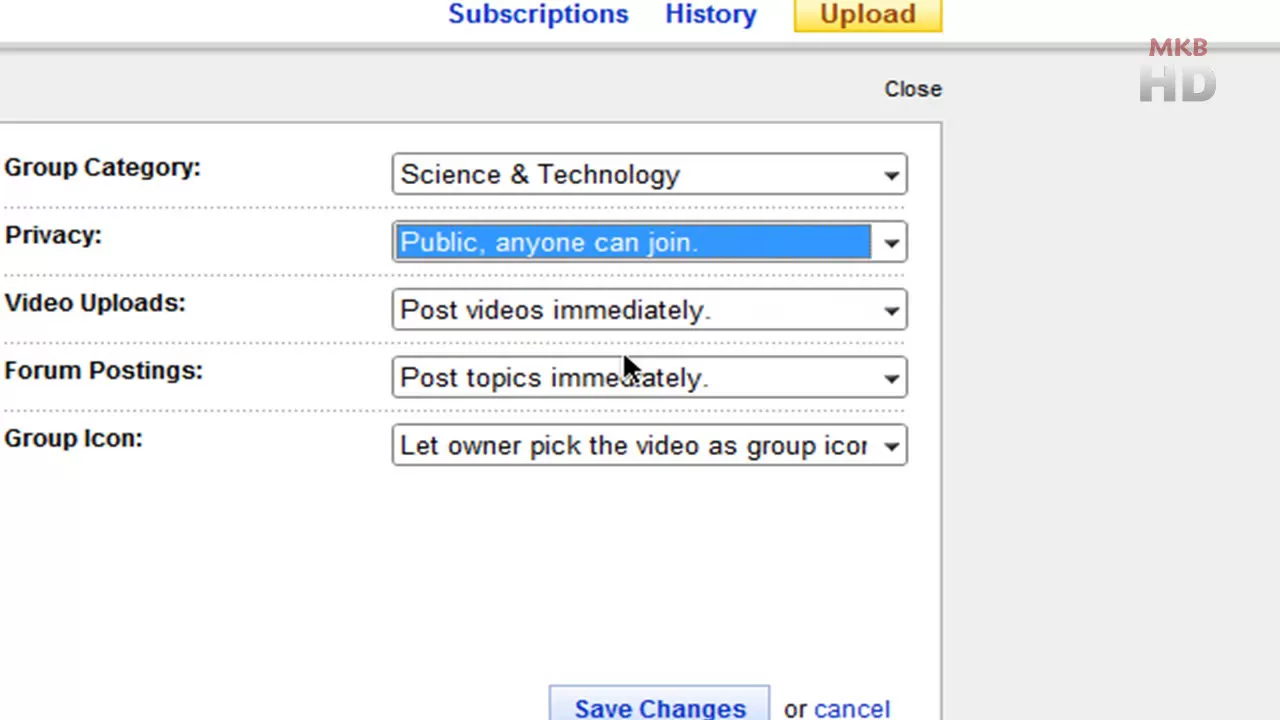
HD Tutorial: Edit Youtube Groups [YT 2.0] walks viewers through the newly added YouTube Groups editing feature as of a few days prior to the video's creation. The host demonstrates how to access group settings directly from the group page, then shows which elements can be edited: group name, tags, and the description, with emphasis on correcting typos and better describing the group. He notes that the group category can be changed to a more representative label, such as Science and Technology in his example, to improve discoverability. The tutorial also covers visibility options, highlighting that groups can be public or protected, with the latter requiring founder approval to join. Additional settings shown include whether video uploads and forum postings appear immediately, the ability to designate moderators, and the option to customize the group icon, which uses a selected thumbnail style. The video concludes with a quick summary, pointing out that background or theme changes are not yet available and suggesting viewers stay tuned for further updates and additional features. Overall, the presentation emphasizes quick, practical steps for updating essential group information and readiness for broader group management enhancements in future YouTube updates.
Topics · technology · education · how-to · social-media
Questions answered
- How do I change the group icon or image for my YouTube Group?
- Open the group page, go to Settings, expand the editing options, select Change Icon or group image, then save the changes.
- Can I remove members from a YouTube Group or terminate a group?
- The video does not cover removing members or terminating a group; it focuses on editing group information, categorization, and icon changes.
- Why might edits to group settings not save, and what should I do?
- Ensure you complete the edit flow by clicking Save Changes after making modifications, then refresh the page to confirm the updates took effect.