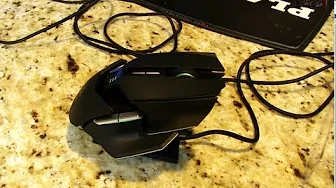
Razer Ouroboros Wireless Ambidextrous Gaming Mouse Unboxing & Review Linus Tech Tips
0 up · 0 down · 0 ratings
Description
Razer Ouroboros Unboxing & Review: Overall it's very customizable, but may be a "jack of all trades, master of none" compared to my all time favourite palm & claw grip mice. CA/International: ncix.com US: us.ncix.com
Razer Ouroboros Wireless Ambidextrous Gaming Mouse Unboxing & Review presents a thorough first look at Razer's premium ambidextrous wireless mouse. The video opens with unpacking, comparing packaging style to the Mamba, and highlights the wireless latency claim that mirrors wired performance. Linus recalls the Mamba era and explains how the Ouroboros can operate either wirelessly or in wired mode using the included braided cable, with charging while in use. He notes the packaging contents, including Synapse 2.0 software and the product guide, and explains how the software preserves settings both online and offline, which is central to Razer’s cloud-based customization. The host also introduces the concept of magnetically swappable components and later demonstrates how to remove or attach pieces to tailor the mouse for different grip styles. He emphasizes the goal of achieving a highly customizable experience while acknowledging that the device aims to cover multiple playstyles rather than excelling at a single niche. By the end, he sets up the base station, explains the quick pairing process, and teases the performance potential of the 8200 DPI sensor within a wireless frame. In a middle section, the reviewer dives into physical adjustability. He demonstrates how the palm rest position and the overall length of the mouse can be modified, including subtle tilt adjustments to accommodate different hand sizes. The camera showcases the magnetic side panels, which enable left or right handed configurations and allow or disallow DPI changes mid-use. Linus discusses the practical usability of the magnetic pieces, noting they secure firmly yet detach when intentionally manipulated. He also compares the Ouroboros to other popular mice like the G9 and Sensei, offering a nuanced view on how this device sits as a jack-of-all-trades versus a master of a single style. The segment includes real-world testing with his wife to illustrate how the adjustments impact comfort for different users. By the conclusion of this section, the importance of grip type (palm vs claw) and finger placement becomes clear, shaping how one might set up the device for optimal control. The reviewer remains candid about minor ergonomic caveats, such as the difficulty of locating a natural resting place for a ring finger, and provides practical workaround ideas. The review continues with a detailed tour of the input surface, button layout, and sensor capabilities. Linus walks through the six visible side buttons, reprogrammable via Synapse, and the on-device DPI locking feature enabled by the magnetized “gear locks.” He highlights how this design reduces accidental DPI changes during gameplay, a contrast to other mice that require dedicated buttons. The microphone-like micro-movements in the wheel and the tactile feel of the scroll wheel are described, along with adjustable lift-off height and precision levels. He runs through the software settings for brightness, lighting, and power management to optimize wireless operation and battery life. The commentary ties the hardware features back to practical gameplay benefits, suggesting up to five DPI stages for nuanced sensitivity control. Finally, Linus reflects on whether the Ouroboros represents a premium but potentially over-engineered solution, noting that for some users the trade-offs are justified by its flexibility. The video ends with a light note on the included weighted base station and a reminder to subscribe for more unboxings and computer videos. Overall, the presentation blends technical detail with hands-on experimentation and real-user testing. The reviewer emphasizes adjustability, easy magnetic changes, and Synapse 2.0’s persistent settings as key strengths. He also calibrates expectations by comparing the device to established favorites, explaining why it might not perfectly fit everyone’s preferred grip. Viewers gain practical guidance on whether the Ouroboros is worth its premium price, depending on their hand size, grip style, and tolerance for the customization journey. The verdict leaves the impression that the Ouroboros is an ambitious, feature-rich peripheral designed to accommodate a broad spectrum of gamers, while acknowledging that some users may prefer more specialized mice for optimized comfort or precision. The unboxing experience and the detailed, iterative setup process reinforce Linus Tech Tips’ hallmark approach to tech exploration and buyer education.
Topics · peripherals · pc_hardware · gaming_accessories · unboxing_review · wireless_devices · sensor_technology
Questions answered
- What is the wireless latency claim of the Ouroboros and how does it compare to wired performance?
- The video notes that the Ouroboros offers wireless operation with less than one millisecond delay, which Linus frames as comparable to wired performance for practical purposes.
- Can the Ouroboros be used both wired and wireless, and how is this achieved?
- Yes, it can be used wirelessly or wired. It includes a braided USB cable for wired use and charging, allowing you to connect it to a PC while not sacrificing wireless capability.
- How many DPI settings are configurable and how adjustable is the overall sensitivity?
- The mouse supports multiple DPI stages with up to high sensitivity settings, including up to 8200 DPI, and the stages can be configured in software to suit different monitors and play styles.