Old vs New Storage Drives - SSD & HDD All-out Slugfest!
0 up · 0 down · 0 ratings
Channels and socials
Last year we put an old HDD against a new SSD, but you folks weren't fully satisfied with our testing procedure. So we're back with a complete follow-up! Intel link: linustechtips.com Pricing & discussion: linustechtips.com Support us: linustechtips.com Join our community forum: bit.ly twitter.com @LinusTech Title: Laszlo - Supernova Video Link: youtube.com iTunes Download Link: itunes.apple.com Artist Link: soundcloud.com Outro Screen Music Credit: Approaching Nirvana - Sugar High youtube.com
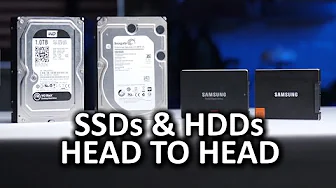
The video revisits the classic SSD vs HDD slugfest, this time with a more controlled setup to address previous concerns about test variables. The host explicitly states that a fresh operating system will be installed on all drives, and adds newer test components to ensure a fair comparison across a broader set of storage devices. The lineup includes a Western Digital 1 TB HDD, a six terabyte enterprise HDD, an aging Samsung 830 series SSD, and a newer 850 Pro 1 TB SSD. The testing process mirrors the real world by performing clean installs rather than relying on prior setups, and by running practical tasks such as launching applications, uninstalling software, and calculating drive space, to illustrate how each drive performs under usable conditions. He acknowledges that this is not a sanitized benchmark, but emphasizes that it provides a realistic view of how drives behave when fresh and after years of use. The results show a clear edge for the SSDs in everyday tasks while highlighting the benefits of larger hard drives for mass storage and easier data recovery, with the 850 Pro standing out as exceptionally fast. The host previews potential future tests with NVMe drives, signaling that the experiment will continue to evolve as new storage technologies mature, and invites viewer feedback on further avenues to explore. Overall, the video balances informative measurements with practical, real-world relevance, helping viewers understand how SSDs and HDDs compare in typical computing scenarios and what trade-offs to expect when upgrading storage hardware.
Topics · technology · hardware · performance · storage · computing
Questions answered
- Which drives were tested in the follow-up comparison and what was the testing approach?
- The test included a Western Digital 1 TB HDD, a six TB enterprise HDD, an aging Samsung 830 Series SSD, and a 1 TB Samsung 850 Pro SSD. A fresh operating system was installed on all drives, and the drives were tested using real-world tasks such as launching applications, uninstalling software, and calculating drive space to gauge practical performance rather than relying on a single synthetic benchmark.
- What were the key conclusions about SSDs versus HDDs from this test?
- SSDs showed significantly faster performance in daily tasks and system responsiveness, with the 850 Pro being notably fast among the tested SSDs. HDDs still offered advantages for large storage capacity and data recoverability, but the overall takeaway is that SSDs provide a much more responsive experience for typical computer use, while HDDs are suitable for mass storage needs.