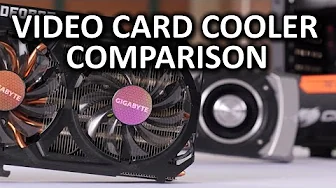
Internal vs Rear Exhaust GPU Coolers
0 up · 0 down · 0 ratings
Channels and socials
When the average gamer shops for a new video card, should they look for an aftermarket, internal-exhaust card, or is the "reference" blower design a better choice? Intel NUC giveaway link: linustechtips.com Sponsor link: linustechtips.com Pricing & discussion: linustechtips.com Support us: linustechtips.com Join our community forum: bit.ly twitter.com @LinusTech Intro Screen Music Credit: Adhesive Wombat -
Check out his channel here: youtube.com Outro Screen Music Credit: Approaching Nirvana - Sugar High youtube.com
The video analyzes how different GPU cooler designs affect overall system thermals, noise, and performance in a realistic, mid-range build. It compares a reference rear-exhaust blower design, as seen on Nvidia or AMD reference cards, with an open-air cooler used on non-reference cards from manufacturers like Gigabyte. The presenter sets up a compact mid-tower system with minimal special-case cooling, using a GeForce GTX 780 Ti wind force model and a reference GTX 780 Ti, both on the same PCB to keep the comparison fair. Temperature measurements are taken at the front intake, rear exhaust, and inside the case near the CPU cooler, under both idle and load conditions with Crisis 3 and Unrealistic synthetic benchmarks. The results show that while open-air coolers can keep the GPU slightly cooler under load, the overall system temperatures rise because the rest of the case takes on more heat, reducing boost headroom. The wind force card is noticeably louder, increasing overall system noise, while the reference blower design can offer a case temperature advantage by venting heat more effectively from the chassis. The takeaway for a typical PC gamer is to prioritize balanced cooling: open-air GPUs may improve GPU temps but require careful case ventilation to avoid hotter components and louder operation; alternatively, a blower-style cooler can keep the case cooler but may limit GPU cooling efficiency in some scenarios. The discussion ends with a suggestion to test different configurations and a nod to potential future tests with other system setups, emphasizing that responsible cooling and airflow management are key to real-world performance. The video also briefly highlights a compact Intel NUC demo to illustrate how small form-factor machines can benefit from passive cooling and quiet operation.
Topics · hardware · computer-hardware · gpu-cooling · pc-build
Questions answered
- What was the main finding about GPU temps in blower vs open-air designs?
- Open-air designs tended to keep the GPU cooler under load, while blower designs often resulted in higher GPU temperatures but a cooler overall case environment due to venting heat out of the chassis.
- Which design was louder in the tests, and what was the impact on the system overall?
- The open-air configuration with the wind force card was noticeably louder, leading to a louder overall system than the blower reference card.
- What practical advice does the video give to typical PC builders?
- Aim for balanced cooling by ensuring good case ventilation if using open-air GPUs, or consider blower-style coolers if you want a cooler case temperature, and be prepared for potential trade-offs in GPU temps or noise depending on the setup.