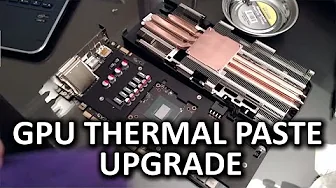
Video Card Thermal Compound Upgrade - Secret to Better GPU Performance?
0 up · 0 down · 0 ratings
Channels and socials
Can you actually get performance gains by upgrading the thermal paste on your GPU? Massdrop link: dro.ps Sponsor link: linustechtips.com Pricing & discussion: linustechtips.com Support us: linustechtips.com Join our community forum: bit.ly twitter.com @LinusTech Intro Screen Music Credit: Adhesive Wombat -
Check out his channel here: youtube.com Outro Screen Music Credit: Approaching Nirvana - Sugar High youtube.com
This video walks through a hands-on upgrade of a graphics card's thermal compound to determine if better thermal interface material (TIM) can reduce temperatures or improve overclocking headroom. The host explains what thermal compound is and why it sits between the GPU die and the cooler, noting that too thick a layer can insulate the core while too little compound fails to transfer heat effectively. The chosen card is an EVGA GeForce GTX 960 with an ACX 2.0 Plus cooler, and the host emphasizes preserving warranty conditions, mentioning EVGA's stance on returning to stock configuration for RMAs. The preparation steps are detailed: disassembling the cooler, cleaning both the GPU and the cooler base with isopropyl alcohol, and applying a conservative amount of TIM using the line method or a central dot. The host also covers cautions about thermal pads on voltage regulators or memory chips, recommending reuse of pads of identical thickness when present. Once the old paste is removed and the surface is clean, the cooler is reattached in a cross-pattern sequence, and the system is re-tested under the same overclocking parameters to isolate the effect of the TIM upgrade. The measured result shows a modest improvement in GPU temperature (roughly 3 degrees Celsius) under load, with a note that real-world gaming clocks and temperatures can vary from synthetic stress-test results. The video frames the TIM upgrade as a low-cost, low-risk experiment that can offer tangible headroom for overclocking or quieter operation, especially for older hardware where TIM degradation is more likely. Finally, the host broadens the discussion to consider why some manufacturers use different TIMs and why even factory paste can vary in quality, suggesting that refreshing TIM can be worthwhile for longevity and potential performance gains. The outro expands into related topics like cooling hardware deals and Massdrop promotions, but the core takeaway remains practical: replacing TIM can yield measurable gains if temperatures were a limiting factor, and it is a reasonable project for a weekend hardware tweak.
Topics · hardware · gpu · overclocking · cooling
Questions answered
- What is thermal compound and why is it used between the GPU and its cooler?
- Thermal compound fills microscopic gaps to improve heat transfer between the GPU die and the cooler, helping to remove heat more efficiently.
- What precautions should be taken when replacing TIM on a GPU?
- Disconnect power, handle the card carefully to avoid damaging connectors, test for complete cooler removal, clean both surfaces with isopropyl alcohol, avoid leaving residue, and reassemble in a cross pattern to ensure even pressure.
- Does upgrading TIM guarantee higher clocks or lower temperatures in all cases?
- No, results vary by card, workload, and cooling solution; TIM upgrades can improve temperatures and headroom, but are not guaranteed to dramatically increase clocks in every scenario.