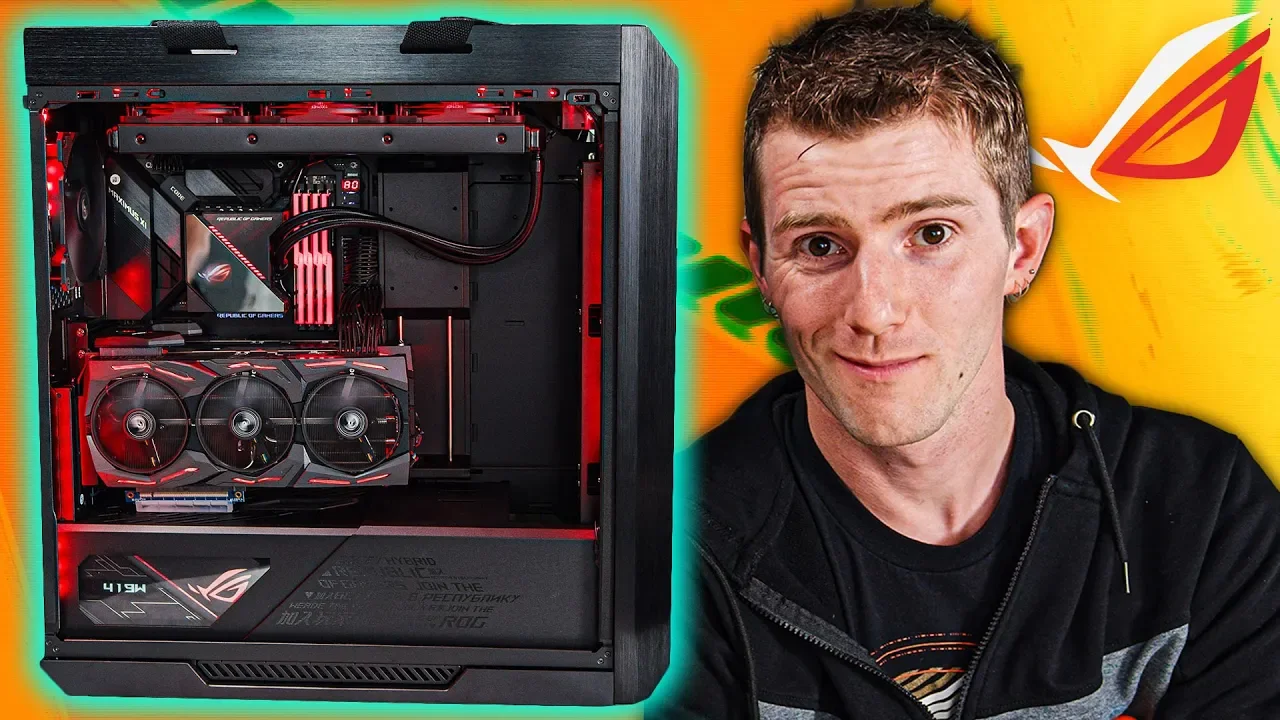
The All-ROG Gaming PC!
0 up · 0 down · 0 ratings
Description
Thanks to ASUS for sponsoring this video for Intel Gamer Days! -
Promos
Check out the celebration and more deals at gamerdays.intel.com Enter to win one of two ASUS ROG Zephyrus M GU502 gaming notebooks lmg.gg The PC of the Republic is here – Join us as we build the all-ROG gaming machine from the ground up and take it for a spin! Buy Intel 9900K Processor: On Amazon: shop-links.co On Newegg: lmg.gg Buy ASUS ROG Geforce RTX Strix 2080Ti: On Amazon: shop-links.co On Newegg: lmg.gg Buy ASUS ROG Helios ATX Case: On Amazon: geni.us On Newegg: lmg.gg Buy ASUS ROG Maximus XI Code Motherboard: On Amazon: geni.us On Newegg: lmg.gg Buy ASUS ROG Thor PSU 1200W 90+ Platinum: On Amazon: geni.us On Newegg: lmg.gg Buy ASUS ROG Swift PG27UQ 4K 144hz Gaming Monitor: On Amazon: geni.us On Newegg: lmg.gg Buy ASUS ROG Ryujin 360 CPU AIO Cooler: On Amazon: geni.us On Newegg: lmg.gg Buy G.Skill Trident Z RGB 64GB 3200 Memory: On Amazon: geni.us On Newegg: lmg.gg Purchases made through some store links may provide some compensation to Linus Media Group. Discuss on the forum: linustechtips.com Our Affiliates, Referral Programs, and Sponsors: linustechtips.com Get Private Internet Access today at geni.us Displate metal posters: lmg.gg Linus Tech Tips merchandise at lttstore.com Linus Tech Tips posters at crowdmade.com Our Test Benches on Amazon: amazon.com Our production gear: geni.us Twitter - twitter.com Facebook - @LinusTech Instagram - @linustech Twitch - twitch.tv Intro Screen Music Credit: Title: Laszlo - Supernova Video Link: youtube.com iTunes Download Link: itunes.apple.com Artist Link: soundcloud.com Outro Screen Music Credit: Approaching Nirvana - Sugar High youtube.com
The video documents the ambitious build of what Linus calls the All-ROG Gaming PC, a project assembled with a full lineup of ASUS ROG components for an Intel Gamer Days sponsorship. The hosts introduce the concept of an all-ROG machine and immediately dive into component choices, starting with the Maximus XI Code motherboard and the Core i9 9900K processor, highlighting the balance between gaming performance and features like Intel Quick Sync for content creation workflows. They emphasize RGB integration as a central design cue, and note that while some parts are not yet available from ROG, the build intends to push the envelope with high capacity memory and sophisticated cooling. Throughout the build, they discuss the rationale for each component, including memory (64GB of G.Skill Trident Z RGB at 3200 MHz), storage (NVMe drives in RAID 0), and AIO cooling, while exploring the case’s unique layout and RGB control system. The narrative also covers cable management strategies, front panel connectivity challenges, and the clever use of an RGB hub and a display-enabled PSU to deliver a visually cohesive system. They proceed to install dual GPUs with SLI expectations, explain the limitations of certain RTX bridge configurations, and showcase PCIe riser cables and a modular approach to power and data cabling. In the final phase, the team tests the rig with Cinebench, GPU-z, and real-time gaming at 4K HDR with RTX features, concluding that the system runs at high efficiency and impressive performance. The video closes with reflections on the design synergy between motherboard, chassis, and cooling, and promotes the Intel Gamer Days deals and related giveaways while acknowledging the high-end nature and cost of the build. Overall, the hosts present a detailed, hands-on tour of an extreme, RGB-rich gaming PC built around ROG hardware, illustrating both the practical assembly steps and the aspirational aesthetics that accompany a premium showpiece.
Topics · technology · pc-builds · gaming-hardware · sponsorships · computing · hardware-review
Questions answered
- What motherboard and processor form the core of the All-ROG build, and why were they chosen?
- The build centers on an ASUS ROG Maximus XI Code motherboard and an Intel Core i9-9900K processor. They were chosen for their proven performance, mature platform, and features like Intel Quick Sync which benefit content creation workflows and gaming performance.
- How is RGB hardware integrated into the build, and what unique features does the case offer for cable management and cooling?
- RGB is integrated through G.Skill Trident Z RGB memory, an RGB controller hub (ROG Aura Terminal), and RGB fans. The case organizes cables neatly with parallel routing behind the motherboard tray, a visible built-in display on the PSU, and a multi-level cooling/pump arrangement that keeps RGB devices and cooling visible and centralized.
- What storage configuration is used, and what is notable about mounting the NVMe drives?
- Two 1TB Samsung 970 Pro NVMe drives are installed in RAID 0 for maximum performance. A notable feature is a mounting design that allows the drives to be held securely with a single screw, simplifying installation.
- What challenges do the builders face with USB header routing, and how are they addressed?
- The build requires multiple USB headers, including USB 2.0, 3.0, and 3.1. They address header shortages by combining two USB 2.0 lines to fit a single header, using an adapter approach, and employing a cable management shroud to keep bulky cables out of sight.
- What performance benchmarks or demonstrations are used to evaluate the system, and what are the takeaways?
- Cinebench R15 is used to gauge CPU performance, showing around 4.7 GHz with a score near 1996. In gaming tests, Shadow of the Tomb Raider at 4K HDR with RTX and DLSS demonstrates the system’s capability to run demanding workloads smoothly, confirming the build’s high-end performance envelope.