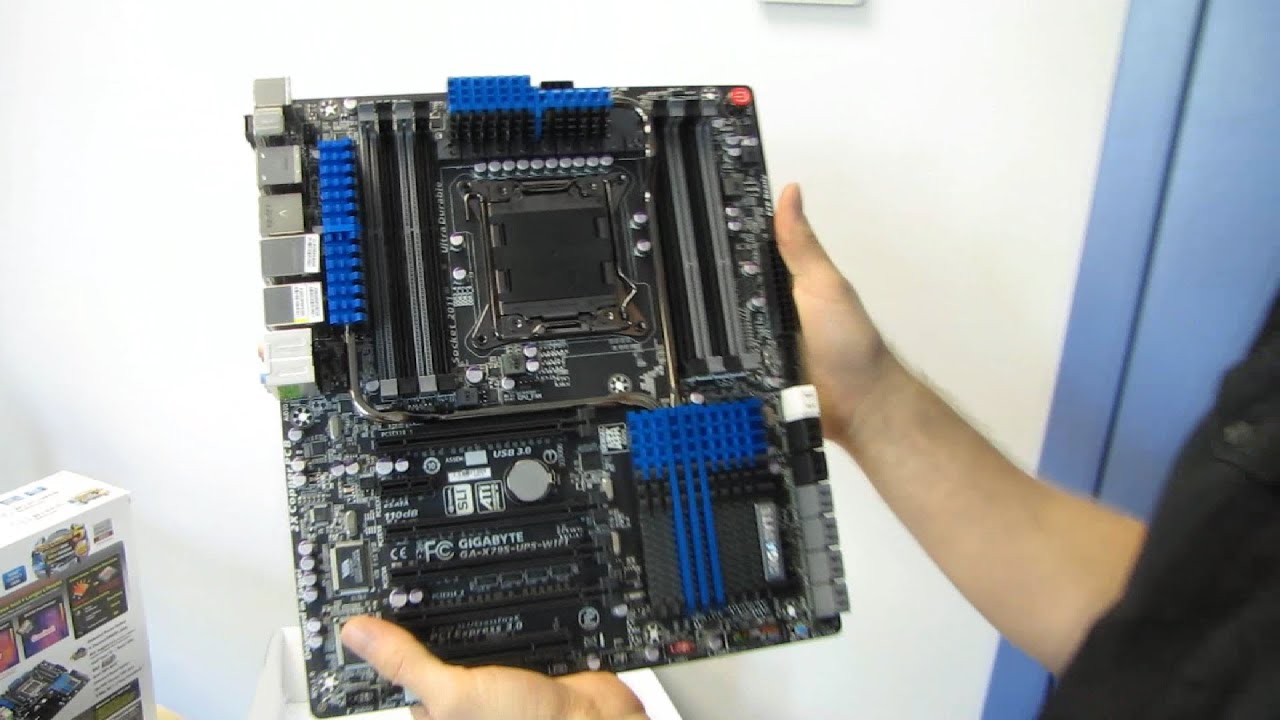
Gigabyte X79S-UP5 WIFI Workstation Class Motherboard Unboxing & First Look Linus Tech Tips
0 up · 0 down · 0 ratings
Description
The X79S-UP5 Wifi motherboard from Gigabyte gets unboxed. Right here. Right now. CA: ncix.com US: us.ncix.com
Linus Tech Tips presents an unboxing and first look at the Gigabyte X79S-UP5 WiFi workstation class motherboard. The video opens with Linus expressing strong excitement for a board he believes could be a centerpiece for his own upcoming rig upgrade, highlighting a redesigned VRM with an industry-leading 60 amp power stage, improved efficiency, and lower thermal losses. He discusses the electronics pedigree, noting the high quality power components and the five-year warranty promise in the US and Canada, framing the X79S-UP5 as a robust, workstation-grade platform. Throughout the unboxing, the host walks through the included accessories, such as a PCI Express Wi-Fi/Bluetooth module, SLI and Crossfire bridges, and a well-organized IO shield, before turning to the motherboard itself and describing its distinctive matte black aesthetic and compact yet capable layout. He emphasizes a balance of performance, cooling, and expandability, underscoring Gigabyte’s design decisions around VRM placement, a two-time copper PCB, and a non-XLATX footprint that aims for broad case compatibility while maximizing heat management. The video then dives into the board’s detailed feature set, including eight DIMM slots supporting up to 64 GB of RAM, eight SAS and multiple SATA ports powered by the Intel C606 chipset, dual BIOS, and a front panel USB 3.0 header, all arranged to optimize airflow and power delivery. Finally, Linus reflects on the overall package, praising the color scheme, cooling strategy, and Gigabyte’s perceived reliability, and closes with a call to subscribe for more unboxings and computer content. The host also examines the PCI Express layout, noting the six PCIe slots with three full x16 lanes and the absence of a PLX switch, which preserves lower latency while maintaining strong bandwidth for multiple GPUs. He explains the rationale behind 3x–8x configurations and describes how the board supports practical multi-GPU setups, legacy PCIe devices, and high-density storage, thanks to its SAS and integrated SATA/SATA-Express connectivity. The discussion includes practical considerations for builders, such as front-panel USB headers, power arrangement, and placement of the 8-pin power connector behind the PWM area to maximize efficiency. In closing, the video positions the X79S-UP5 as a premium Gigabyte board targeted at enthusiasts and workstation users who demand extensive I/O, robust VRM performance, and flexible expansion in a compact EATX footprint.
Topics · technology · hardware · unboxing · pc-build · workstation-motherboard
Questions answered
- What makes the Gigabyte X79S-UP5 WiFi suitable for workstation builds?
- It includes a redesigned VRM with a 60 amp power stage, abundant storage and expansion options including 14 SATA/SAS ports, ECC memory support with Xeon compatibility, dual BIOS, and a robust cooling design, all housed in a workstation-grade layout for reliability and performance.
- Does the board support multiple GPUs without a PLX switch, and how is bandwidth managed?
- Yes, it uses PCIe 3.0 slots with 16x and 8x lanes and no PLX switch, providing high bandwidth with lower latency suitable for multiple GPUs.
- What accessory add-ons come with the board?
- The package includes a PCI Express Wi-Fi/Bluetooth module, three-way SLI/CF bridges, a well-organized IO shield, and standard cables and manuals.