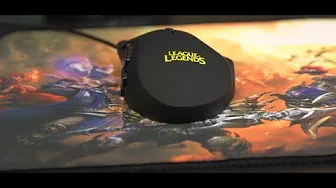
Razer Naga Hex LoL Edition Unboxing
0 up · 0 down · 0 ratings
Channels and socials
Want a League of Legends mouse??? The Razer Naga Hex might be the perfect one! Read more & join our community forum: bit.ly twitter.com @LinusTech Buy it now at NCIX: ncix.com
The video opens with a brief sponsor mention before diving into an unboxing of the Razer Naga Hex LoL Edition. The host explains the Hex is a six-button side mouse designed for streamlined in-game command access, contrasting it with the original Naga which has twelve side buttons. He shares personal impressions about ergonomic comfort, noting the contoured shape suits smaller to medium hands and highlighting the added thumb rest that helps prevent accidental presses while lifting the mouse. The packaging and included extras are shown, including stickers, a League of Legends champion code, and a couple of interchangeable thumb rests to tailor grip. The host describes the Naga Hex’s design updates such as relocating back and forward buttons near the DPI sensor area and the switch to a League-branded illuminated logo and yellow scroll wheel for aestetic coherence with the LoL branding. He also touches on hardware specifics like the 5600 DPI sensor, mechanical side buttons rated for up to 250 million clicks, and Synapse 2.0 cloud software for profile storage, noting improvements that allow offline use. The video transitions to a quick look at the bundled League of Legends Goliath mouse pad, describing its weave, anti-fray edge, and rubber base before concluding with a recap of the device’s fit for gamers who want a compact, highly configurable side-button setup. In closing, the host references the accessibility of a LoL code and encourages viewers to subscribe for more unboxings and tech content while noting the 24 clickable zones feature of the mouse. Overall, the unboxing blends practical evaluation with hands-on demonstrations of setup and customization. The host compares the Hex to prior Razer mice, emphasizes the improved thumb-rest design for safer lifting and easier navigation, and explains how Synapse 2.0 enhances portability of personalized settings. The coverage of packaging and bonus items adds value for potential buyers, while the quick pad review rounds out the product bundle. Viewers gain a clear sense of the Hex’s intended audience,gamers who want a compact, sensor-accurate mouse with a manageable number of programmable buttons,and are left with practical takeaways about compatibility with offline mode and the controller’s durability promises.
Topics · technology · gaming · peripherals · unboxing · computer hardware
Questions answered
- What distinguishes the Razer Naga Hex from the original Naga in terms of button layout?
- The Naga Hex has six side buttons instead of twelve, and it adds a centered thumb rest to help locate the buttons and to reduce accidental presses when lifting the mouse.
- What software feature supports customizing and transferring mouse profiles, and can it work offline?
- Synapse 2.0 is the cloud-based software that stores and syncs profiles, and it now works offline, providing up to date settings without internet access.