I'm Scared of my viewer's MESS - The Setup Doctor
0 up · 0 down · 0 ratings
Description
Promos
Check out the UGREEN NASync on Black Friday: bit.ly While managing your cables can be hard, it didn't have to be this bad. Thankfully, with the power of LTTSTORE.COM and their Magnetic Cable Management products we can fix pretty much any mess that we encounter. With tips and tricks and pegboards and more, The Setup Doctor and his team take Brian's setup from zero to hero. Buy an LG 24MR41A 24" Monitor: geni.us Buy a TP-Link AC750 Wireless Portable Nano Travel Router: geni.us Buy an Edifier R1280DB Bluetooth Bookshelf Speakers: geni.us Buy a VIVO Single Monitor Arm: geni.us Buy a Bracwiser Single Monitor Mount: geni.us Buy a UGREEN HDMI Switch: geni.us Buy a ALAMENGDA Test Bench: geni.us Get cables from infinitecables.com Purchases made through some store links may provide some compensation to Linus Media Group. 3D Printed Skadis Mounts: printables.com LTT Screwdriver Skadis Hanger: printables.com Discuss on the forum: linustechtips.com ► GET OUR MERCH: lttstore.com ► GET EXCLUSIVE CONTENT ON FLOATPLANE: lmg.gg ► GET A VPN: piavpn.com ► SPONSORS, AFFILIATES, AND PARTNERS: lmg.gg Purchases made through some store links may provide some compensation to Linus Media Group. CHAPTERS --------------------------------------------------- 0:00 Intro 1:25 Meet Brian 1:48 What a mess 3:02 Diagnosis 3:28 Cleaning up 4:53 Let's get to setting up 7:36 Second setup 9:40 Back to the main issue 10:28 Getting the setup organized 14:39 Final result! 16:18 Outro
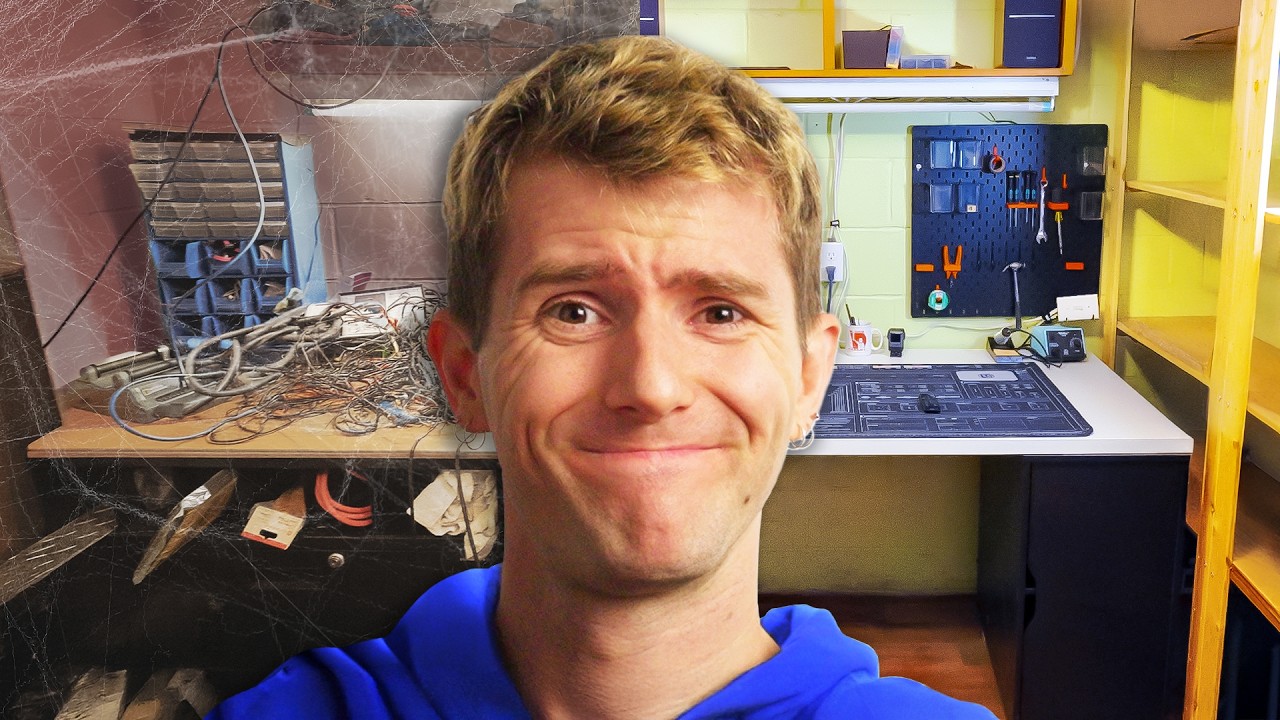
The Setup Doctor visits Brian, a nonprofit summer camp director whose workspace has become a chaotic, overstuffed hub of aging hardware and underutilized storage. The opening segments establish Brian’s background, his lack of time for personal workspace improvements, and the emotional reaction to the mess. The video frames this as a teachable teardown: diagnose the root cause of the clutter, then design a structured, modular system that brings order without sacrificing accessibility. The team identifies key issues such as insufficient desk space, scattered components, and a lack of organized storage that leads to cables sprawling across the desk. The host introduces the goal of transforming the space into a clean, functional area with improved cable management, better furniture, and practical storage solutions. By weaving humor with practical fixes, the episode sets expectations for a dramatic before-and-after reveal and a more efficient workflow for Brian. In the middle act, the crew lays out a concrete plan to reclaim the space. They propose integrating pegboard walls, a larger storage shelf, and a rollable flex space that can be moved as needed. The team also discusses upgrading the main bench with magnetic cable management arches, a stronger power solution, and a dedicated server/test bench to streamline hardware swaps. They explore routing, network placement, and the ergonomics of access, including where to position routers and switches for reliable connectivity. The discussion emphasizes modularity, with drawers and shelves designed to hold components, cables, and tools in predictable places. Throughout, the dialogue balances technical specificity with approachable explanations, showcasing how simple design choices dramatically reduce clutter. As the workflow unfolds, the Setup Doctor crew unveils the new layout step by step. They install pegboards, relocate a floating shelf, and repurpose a left-hand table into a rollable work surface. They install a magnetic cable management plate, demonstrate tidy cable runs, and test the ease of pulling cables in and out for maintenance. The narrative highlights the upgrade to Brian’s NAS-based backup system, the UGREEN NASync DXP 4800 Plus, and the ability to expand storage with future hardware, all while keeping the area visually clean. They add a white desk surface covered by a modular mat, a compact router for better wireless coverage, and Edifier bookshelf speakers for better audio during work. By the finale, the space feels transformed: organized storage, clean cable pathways, a dedicated server/display area, and accessible power management, all contributing to a much more productive environment. The closing moments celebrate the dramatic transformation and acknowledge the collaborative effort. Brian reflects on the changes with gratitude while smiling at the new, neat setup. The team underscores the ongoing importance of maintenance and staying organized, even when inspiration fades. The video wraps with a preview of the sponsored gear and a nod to future Setup Doctor episodes, inviting viewers to see more organization magic and practical setups. Technically, the episode demonstrates how a thoughtful mix of pegboards, magnetic management, and modular furniture can convert a cluttered workspace into a clean, efficient zone ready for daily use, testing, and creative projects, all within a nonprofit context.
Topics · technology · cable-management · home-office · do-it-yourself · workspace-organization
Questions answered
- What is the main goal of The Setup Doctor episode with Brian?
- To diagnose the root causes of a messy workspace and implement a modular, organized setup with better cable management, storage, and accessibility.
- What sponsor products are featured in the episode?
- UGREEN NASync DXP 4800 Plus and related NAS hardware, magnetic cable management products from LTT Store, and several peripheral accessories.
- What changes were made to the workspace?
- New pegboard walls, a larger storage shelf, a rollable flex space, magnetic cable management, a white desk with a mod mat, a small router, Edifier speakers, and a dedicated server/test-bench area.