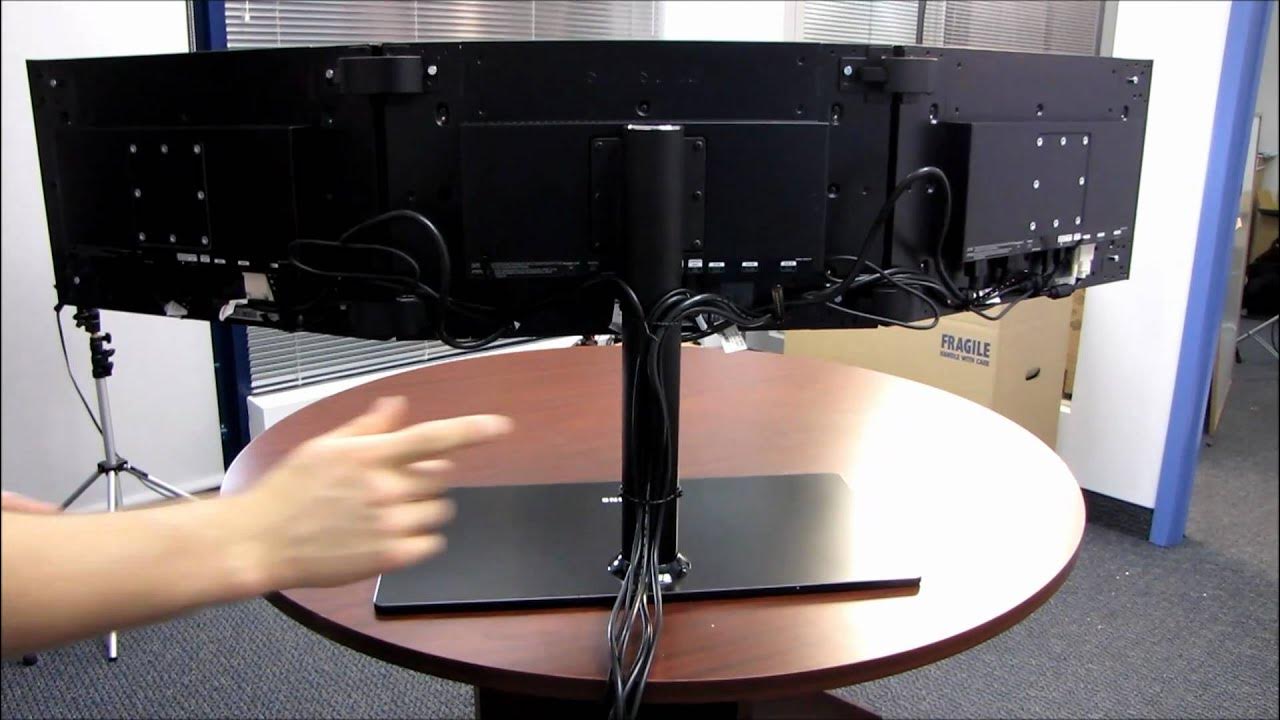
Samsung MD230X3 Eyefinity Monitor Showcase & First Impressions Linus Tech Tips
0 up · 0 down · 0 ratings
Description
ncix.com I've got the whole thing assembled, which didn't actually take that long, and I show you guys how the whole thing fits together, and how it looks when it's done.
The video showcases the Samsung MD230X3 Eyefinity monitor setup in a detailed and practical format. Linus walks through the unboxing and assembly process, highlighting how the triple monitor stand fits together and how the overall width and reach compare to his arm span. He emphasizes that the stand is noticeably wider than a single panel and that the height is adjustable, which adds flexibility for personal viewing height. The speaker then describes the physical construction and finish of the enclosure, noting a rugged, industrial look that almost feels custom made for this specific configuration rather than mass produced. He also explains the cable management strategy in depth, including how to daisy chain power to all three panels, the mix of DVI and DisplayPort connections, and the placement of the USB control pod to manage inputs and peripherals. The section culminates with practical tips on tidying cables along the back and a summary of the final cabling bundle, which includes two DVI cables, one power cord, and one DisplayPort connection. The video also covers the hinge adjustments, showing how the screens can be angled up to 30 degrees or laid flat, and he demonstrates two layout options: a wide landscape configuration or a vertical stacked arrangement for a different aesthetic. As the first impressions wrap up, Linus notes the relatively quick assembly time and the longer duration dedicated to cabling, and teases future content that will test the setup with actual gaming in action.
Topics · hardware · monitor setup · technology · video producer notes
Questions answered
- What is the MD230X3 Eyefinity monitor configuration and how is it assembled?
- The MD230X3 is a triple monitor setup using three Samsung MD230X3 panels connected via a stand. Assembly is quick, with the framework of the stand going up in about five minutes and cabling taking longer, around twenty minutes, to neatly route power, DVI, and DisplayPort connections along with a USB control pod.
- How flexible is the mount and what display orientations are possible?
- The hinges allow up to 30 degrees of tilt, and the panels can be set flat or arranged in a wide landscape configuration. There is also an option to set the monitors vertically for a portrait layout.