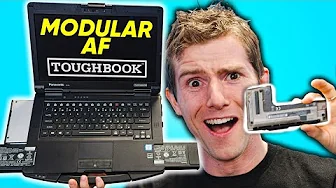
The CRAZY Upgradeable Laptop - Panasonic TOUGHBOOK 55 Showcase
0 up · 0 down · 0 ratings
Description
Thanks to Panasonic TOUGHBOOK for sponsoring this video!
Promos
Check out the TOUGHBOOK 55 at lmg.gg In the world of soldered ram, pentalobe screws and glued down batteries - Panasonic is taking the complete opposite approach with the new Toughbook. They've created a laptop where nearly everything, including the GPU, can be swapped almost instantly. Buy Panasonic TOUGHBOOK On Amazon: geni.us On Newegg: lmg.gg Purchases made through some store links may provide some compensation to Linus Media Group. Discuss on the forum: linustechtips.com Our Affiliates, Referral Programs, and Sponsors: lmg.gg Get a VPN today with PIA at geni.us Get a Displate Metal Print at lmg.gg Get a 30-day free trial of Amazon Prime at lmg.gg Linus Tech Tips merchandise at lttstore.com Linus Tech Tips posters at crowdmade.com Our Test Benches on Amazon: amazon.com Our production gear: geni.us Twitter - twitter.com Facebook - @LinusTech Instagram - @linustech Twitch - twitch.tv Intro Screen Music Credit: Title: Laszlo - Supernova Video Link: youtube.com iTunes Download Link: itunes.apple.com Artist Link: soundcloud.com Outro Screen Music Credit: Approaching Nirvana - Sugar High youtube.com
The video opens by contrasting the current market trend of thinner, lighter devices with the exact opposite direction Panasonic takes with the Toughbook 55, highlighting the emphasis on user serviceability and modular hardware. The presenter showcases a variety of upgrade modules that can be swapped in and out, including a fingerprint reader, RFID module, Bluetooth/wi‑fi components, and even a Blu-ray drive, all designed to be user replaceable. The discussion emphasizes that the device remains compact despite its modularity, arguing that the tradeoffs in weight are offset by the ability to tailor the machine to specific workflows. Throughout the segment, the host demonstrates the practical implications of modular upgrades, such as plug‑and‑play SSDs with hot‑swap capability, RAID configuration options, and the potential for targeted security features like Windows Hello infrared and TPM 2.0. The overall message is that Panasonic has pursued a refreshingly repairable and configurable approach in a space where many competitors rely on soldered RAM and glued components, making the Toughbook 55 a platform aimed at enterprise users who need longevity and customization. In the core section of the presentation the host digs into the enterprise oriented features, explaining that the Toughbook 55 supports a variety of security modules, including a smart card reader and an optional RFID reader for second‑factor authentication. He demonstrates how the fingerprint reader can be swapped in seconds and then replaced with an RFID module or Windows Hello infrared camera, illustrating the device's adaptability to different corporate security policies. The modular design extends to the battery system, where a second 6,300 mAh pack can be added on the opposite side, enabling extended runtimes and even hot swapping of batteries without powering down. The speaker also notes the machine’s support for RAID 1 with an optional SSD upgrade for real time data mirroring, underscoring its suitability for data‑critical environments. A notable portion of the video focuses on the GPU and display options, where Panasonic’s modular PCIe‑style interface allows a graphics card module to be installed, paired with an integrated cooling solution that aligns with the laptop’s chassis. The GPU module is revealed to be a Radeon Pro WX 4150 class card, a surprising choice for a rugged professional laptop, and the presenter shows Rocket League to demonstrate practical performance in a demanding, if casual, gaming scenario. Additional I/O expansions are shown, including an external IO pack with HDMI and USB ports, plus an access hatch for CPU cooling and other high‑demand components. The host also touches on durability features, such as magnesium alloy construction and IP53 water resistance, and explains how the keyboard and other modular pieces can be swapped or upgraded as needed. In the closing portion, the host reflects on the breadth of configurability offered by the Toughbook 55, noting that nearly every major component can be upgraded or replaced by the user or administrator. He teases future loadout possibilities discussed in comments, such as dual battery packs for ultra‑long field use, a dedicated GPU module for portable graphics without a separate enclosure, and upgraded Wi‑Fi to Wi‑Fi 6 for better connectivity on the go. The discussion ends with a call to the audience to share their ideal loadouts, hinting at practical use cases from field technicians to CAD professionals. The video closes by reiterating Panasonic’s modular philosophy as a standout feature in a market accustomed to non‑removable components, inviting viewers to explore further via the link in the description.
Topics · technology · hardware · laptops · enterprise IT · modular design · rugged devices