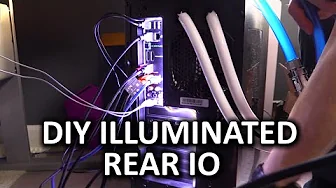
Create Your Own Illuminated Rear IO - DIY Project
0 up · 0 down · 0 ratings
Channels and socials
Have you ever wished you could see what the heck you were doing when trying to plug something into the rear IO on your PC? Here is our solution! Corsair link: linustechtips.com Pricing & discussion: linustechtips.com Support us: linustechtips.com Join our community forum: bit.ly twitter.com @LinusTech Intro Screen Music Credit: Title: Laszlo - Supernova Video Link: youtube.com Outro Screen Music Credit: Approaching Nirvana - Sugar High youtube.com
The video presents a practical, hands-on DIY project to illuminate the rear IO panel of a PC, addressing a common frustration: in a dark room you can barely see what you’re plugging into. The host explains why stock cases often lack rear IO visibility and proposes a simple, affordable solution using a USB-powered 5-volt LED strip with adhesive backing. The tutorial walks through selecting the right LED strip, cutting it to length, and routing the cable along the top IO area, keeping the setup neat and non obstructive to screws and ports. The emphasis is on a power source that remains active even when the PC is off, which is why a 5-volt option is chosen rather than standard 12-volt strips, ensuring visibility without requiring the system to be powered. The presenter demonstrates wiring and placement, then powers up the PC to show the illuminated rear IO, followed by basic cable management to keep everything tidy. The video concludes with a prompt for viewer feedback, a quick plug for related forums and merch, and a lighthearted sign-off that mirrors LinusTechTips’ classic format. The overall takeaway is that a small, inexpensive LED upgrade can greatly improve usability and accessibility when interacting with rear IO, without major hardware changes.
Topics · diy · computer_hardware · hardware_hacking · pc_building