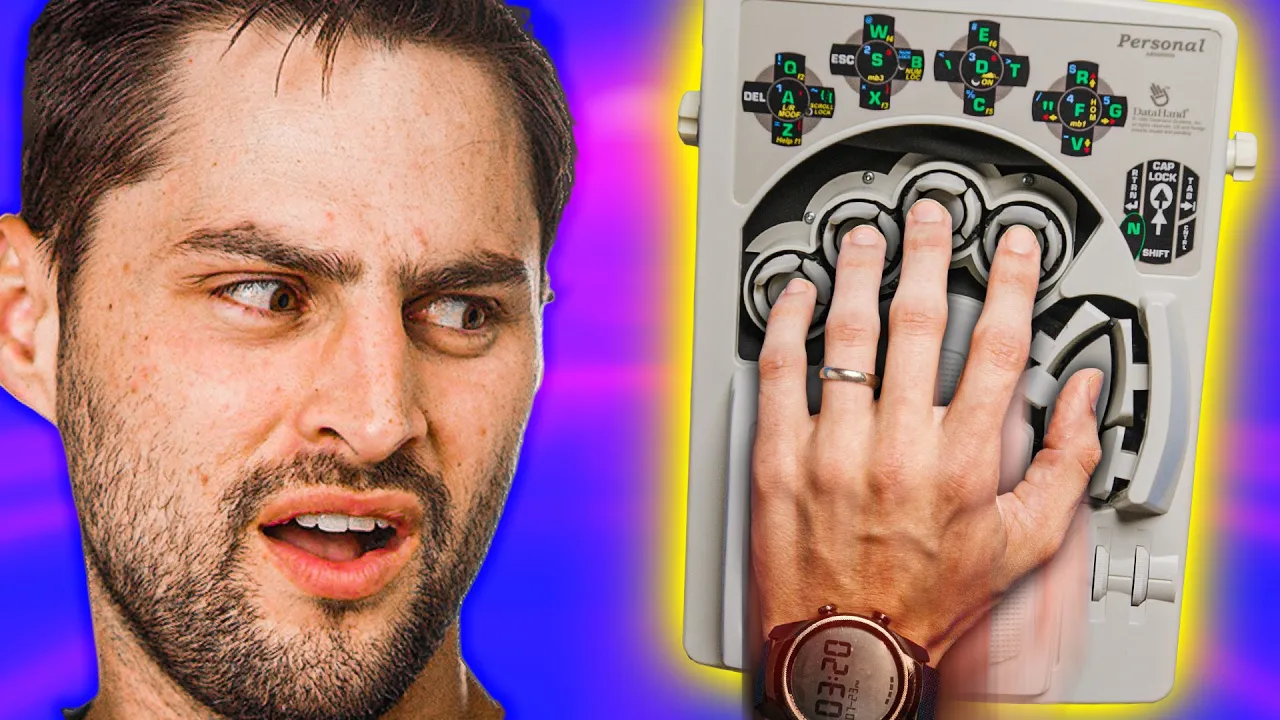
Your Hands Go INSIDE this Keyboard
0 up · 0 down · 0 ratings
Promos
Visit squarespace.com and use offer code LTT for 10% off Buy a Seasonic Ultra Titanium Power Supply: On Amazon: geni.us On NewEgg: lmg.gg Split ergonomic keyboards have been increasing in popularity in recent years as use of computers and the internet has become more frequent. Options like the ErgoDox EZ, the MoonLander, and others have sprung up in the craziest of mechanical keyboard collections, but this may be the one keyboard to rule them all. Discuss on the forum: linustechtips.com ►GET MERCH: lttstore.com ►SUPPORT US ON FLOATPLANE: floatplane.com ►LTX EXPO: ltxexpo.com AFFILIATES & REFERRALS --------------------------------------------------- ►Affiliates, Sponsors & Referrals: lmg.gg ►Check out our podcast gear: kit.co ►Private Internet Access VPN: lmg.gg ►Our Official Charging Partner Anker: lmg.gg ►MK Keyboards: lmg.gg ►Nerd or Die Stream Overlays: lmg.gg ►Official Game Store: nexus.gg ►Amazon Prime: lmg.gg ►Audible Free Trial: lmg.gg ►Our Gear on Amazon: geni.us FOLLOW US ELSEWHERE --------------------------------------------------- Twitter: twitter.com Facebook: @LinusTech Instagram: @linustech Twitch: twitch.tv FOLLOW OUR OTHER CHANNELS --------------------------------------------------- Mac Address: lmg.gg Techquickie: lmg.gg TechLinked: lmg.gg ShortCircuit: lmg.gg LMG Clips: lmg.gg Channel Super Fun: lmg.gg Carpool Critics: lmg.gg MUSIC CREDIT --------------------------------------------------- Title: Laszlo - Supernova Video Link: youtube.com iTunes Download Link: itunes.apple.com Artist Link: soundcloud.com Outro Screen Music Credit: Approaching Nirvana - Sugar High youtube.com Intro animation by MBarek Abdelwassaa @mbarek_abdel Monitor And Keyboard by vadimmihalkevich / CC BY 4.0 geni.us Mechanical RGB Keyboard by BigBrotherECE / CC BY 4.0 geni.us Mouse Gamer free Model By Oscar Creativo / CC BY 4.0 geni.us CHAPTERS --------------------------------------------------- 0:00 Intro 1:06 The design & hardware 2:44 Typing intro 2:55 Staff try it out 3:28 The layout & usage 4:49 "a short time" 5:15 Can you buy one? 5:45 Homebrew projects 6:08 Why did DataHand fail? 7:05 Design suggestions & outro
The video presents the DataHand Personal, a highly unconventional ergonomic keyboard from the 1990s designed to minimize hand movement and finger strain by placing each finger into its own well and enabling four directions of input. The host explains that the two modules are split and adjustable, connected by a long cable, and supported by palm rests that reduce carpal tunnel stress. The design emphasizes minimal finger travel, with each keystroke requiring only a half inch of movement and optical switches that snap back with magnets. While the concept promises ergonomic benefits, the video also highlights significant challenges such as a steep learning curve, high sensitivity that can cause accidental presses, and the need to relearn a large portion of the keyboard layout. The walkthrough includes demonstrations of how the modified layout relocates common letters, why some keys end up on unexpected fingers, and how modifiers unlock multiple layers, including one layer that serves as a mouse, which is portrayed as less desirable. Real-world usability is weighed against practicality, with discussions about the slow initial typing speeds even for skilled typists, and the substantial time investment required to achieve meaningful performance gains. The host relays user anecdotes, noting that some users report months of practice before reaching usable speeds, while others propose open-source alternatives like the lalboard as a more accessible path to similar ergonomic goals. The segment closes with reflections on why DataHand eventually faded from the market, citing a combination of a narrow target audience and a high lifetime cost, and contemplates how today’s enthusiasts might bridge the gap with modern DIY approaches and better ergonomics. Finally, the video suggests that for most users an ErgoDox or Moonlander offers a more practical balance of comfort and learnability, while acknowledging the DataHand’s enduring appeal to keyboard nerds and historians of computer hardware.
Topics · technology · ergonomics · history · open-source-hardware · peripherals · computers · hardware-review
Questions answered
- What makes the DataHand more ergonomic than a traditional keyboard?
- The DataHand places each finger into its own well, reducing finger travel and hand movement, with palm rests to support the wrists and four directional inputs per finger, which lowers strain on the carpal tunnel.
- Why did DataHand struggle commercially despite its ergonomic promise?
- The product had a steep learning curve and a high price, targeting a narrow audience, which limited mass adoption and long-term viability.